As developers, networking tends to feel like something that “just works.” You run curl and get a response. You spin up containers with Docker Compose and they talk to each other. But when only large packets get dropped over a VPN tunnel, or your container network goes completely dark, you can’t diagnose anything without understanding how packets actually move.
This post traces the path packets take at the OS level. Starting with how to read ifconfig output, we’ll work through Ethernet frames, routing tables, and Netfilter/iptables — all the fundamentals you need for network troubleshooting, in a single article.
Network Interfaces — The Kernel’s Doorways
A network interface is an abstracted doorway that the OS kernel creates to communicate with the network.
Just as multiple applications can’t directly control a monitor and must go through the kernel, the same applies to networking. Applications can’t send commands directly to a Wi-Fi chip or access NIC memory — everything must go through the kernel. An interface is this doorway provided by the kernel, and applications simply hand data to it through sockets.
You can view your system’s network interfaces with the ifconfig command.
➜  ~ ifconfig
lo0: flags=8049<UP,LOOPBACK,RUNNING,MULTICAST> mtu 16384
        options=1203<RXCSUM,TXCSUM,TXSTATUS,SW_TIMESTAMP>
        inet 127.0.0.1 netmask 0xff000000
        inet6 ::1 prefixlen 128
        inet6 fe80::1%lo0 prefixlen 64 scopeid 0x1
        nd6 options=201<PERFORMNUD,DAD>

# ... inactive interfaces like gif0, stf0, anpi0-3, en1-6, etc. omitted ...

en0: flags=88e3<UP,BROADCAST,SMART,RUNNING,NOARP,SIMPLEX,MULTICAST> mtu 1500
        options=6460<TSO4,TSO6,CHANNEL_IO,PARTIAL_CSUM,ZEROINVERT_CSUM>
        ether aa:bb:cc:dd:ee:01
        inet6 fe80::xxxx:xxxx:xxxx:xxxx%en0 prefixlen 64 secured scopeid 0xe
        inet 192.168.0.10 netmask 0xffffff00 broadcast 192.168.0.255
        nd6 options=201<PERFORMNUD,DAD>
        media: autoselect
        status: active

bridge0: flags=8863<UP,BROADCAST,SMART,RUNNING,SIMPLEX,MULTICAST> mtu 1500
        options=63<RXCSUM,TXCSUM,TSO4,TSO6>
        ether aa:bb:cc:dd:ee:02
        member: en1 flags=3<LEARNING,DISCOVER>
        member: en2 flags=3<LEARNING,DISCOVER>
        member: en3 flags=3<LEARNING,DISCOVER>
        nd6 options=201<PERFORMNUD,DAD>
        media: <unknown type>
        status: inactive

awdl0: flags=8863<UP,BROADCAST,SMART,RUNNING,SIMPLEX,MULTICAST> mtu 1500
        options=6460<TSO4,TSO6,CHANNEL_IO,PARTIAL_CSUM,ZEROINVERT_CSUM>
        ether aa:bb:cc:dd:ee:03
        inet6 fe80::xxxx:xxxx:xxxx:xxxx%awdl0 prefixlen 64 scopeid 0x10
        nd6 options=201<PERFORMNUD,DAD>
        media: autoselect
        status: active
The output is quite long, but the structure becomes clear once you focus on the key interfaces.
lo0— Loopback. Used for communication with itself (127.0.0.1) that never leaves the machine. Its MTU is 16384 — much larger than usual — because there’s no physical transmission to constrain it.en0— Wi-Fi. The only physical interface withstatus: active, meaning all real internet traffic passes through this doorway. Theetherfield shows the MAC address, andinetshows the assigned IP.bridge0— Thunderbolt Bridge. A virtual L2 switch that groupsen1,en2, anden3as members.awdl0— Apple Wireless Direct Link. Used for peer-to-peer communication between Apple devices, such as AirDrop.
The remaining interfaces — anpi*, en1-6, gif0, stf0, and others — are currently inactive. These are interfaces macOS pre-creates for Thunderbolt ports, tunnel interfaces, and similar purposes.
The key thing to notice is that each interface lists information organized by layer: ether (MAC address), inet (IP), mtu, flags, and so on. To understand what each of these fields means, we first need to understand the structure of an Ethernet frame.
Key Principle: An Interface Doesn’t Necessarily Have Physical Hardware Behind It
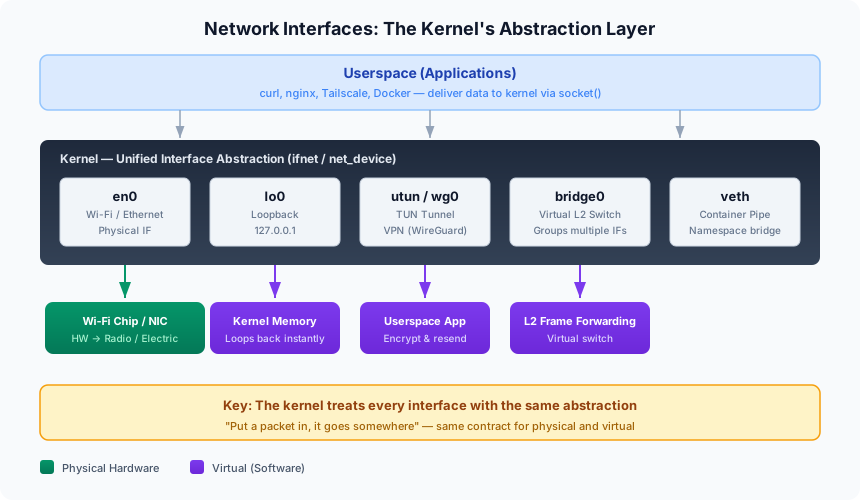
| Interface | What’s Behind the Door | Description |
|---|---|---|
en0 | Wi-Fi chip (hardware) | Packets are converted to radio waves and physically transmitted |
lo0 | Kernel memory | Packets never leave the machine — they loop back immediately within the kernel |
utun / wg0 | Userspace process | A VPN app (e.g., Tailscale) receives packets, encrypts them, and resends via physical interface |
bridge0 | Virtual switch linking multiple interfaces | Forwards frames at L2 |
veth | Container/Pod network namespace | A pipe — packets inserted on one end come out the other |
From the kernel’s perspective, all these interfaces are treated with the same abstraction. The contract — “put a packet in, and it goes somewhere” — is identical whether the interface is physical or virtual. Whether it’s Docker’s veth or Tailscale’s utun, the kernel delivers packets the same way.
Ethernet — The Rules of Communication Within a Network
What Is Ethernet?
Ethernet defines the rules for how devices exchange data within the same network. It’s the IEEE 802.3 standard that covers L1 (Physical) and L2 (Data Link) of the OSI model.
The name originates from “Ether” — the medium 19th-century physicists believed carried light — a metaphor for data traveling through an invisible network medium.
Ethernet Frame Structure
The fundamental transmission unit of Ethernet is the frame.
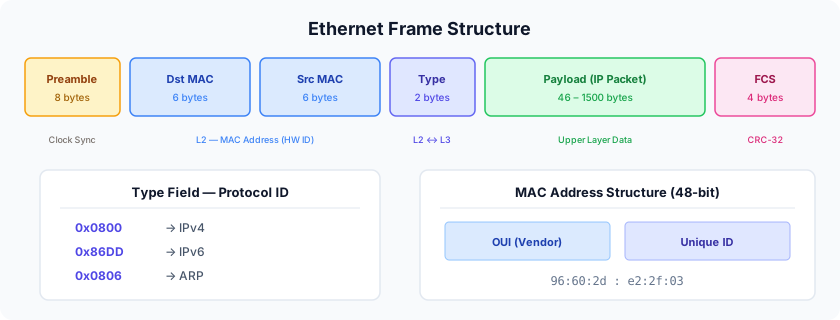
Each field’s role:
- Preamble (8 bytes): A clock synchronization pattern for the receiving NIC (
10101010...). The last byte (SFD) is10101011, signaling “the frame starts here.” - Dst/Src MAC (6 bytes each): Destination and source MAC addresses.
ff:ff:ff:ff:ff:ffmeans broadcast. - Type (2 bytes): Identifies the upper-layer protocol in the payload.
0x0800= IPv4,0x86DD= IPv6,0x0806= ARP. - Payload (46–1500 bytes): Upper-layer data (IP packets, etc.). The standard MTU caps this at 1500 bytes.
- FCS (4 bytes): Frame Check Sequence. Verifies frame integrity using CRC-32.
The data unit at L2 is a frame, while at L3 (IP level) it’s called a packet. The frame wraps an IP packet as its payload, attaching headers to prepare it for transmission.
Naturally, since the IP packet — which contains information like “send this to such-and-such IP address” — now sits inside the frame’s payload, the frame header uses MAC addresses to define “send this to such-and-such MAC address.”
MAC Addresses
A MAC (Media Access Control) address is a 48-bit (6-byte) hardware identifier. The first 3 bytes are the manufacturer (OUI), the last 3 are a unique serial number.
96:60:2d:e2:2f:03
├──────┤├──────┤
  OUI    Unique ID
(vendor)
MAC addresses are only meaningful within the same network segment (L2). Once a packet crosses a router, the MAC is replaced with the next hop’s.
Wi-Fi and Ethernet
Wi-Fi (802.11) is essentially wireless Ethernet. They share the same frame structure and communicate using MAC addresses. That’s why macOS names the Wi-Fi interface en0 — short for Ethernet.
Reading ifconfig Output
Basic Structure
interface: flags=value<flags> mtu value
    options=value<options>
    ether MAC_address         ← L2 (Data Link)
    inet IPv4_address         ← L3 (Network)
    inet6 IPv6_address        ← L3 (Network)
    media: ...                ← L1 (Physical)
    status: active/inactive
The output itself follows OSI layer order — Physical, Data Link, Network — with information listed in that sequence.
Key Flags
| Flag | Meaning |
|---|---|
UP | Interface activated by the kernel |
RUNNING | Link is alive at L1. UP without RUNNING means “driver is loaded but cable unplugged” |
BROADCAST | Broadcast capable (Ethernet family) |
LOOPBACK | lo0 only. Dedicated to self-directed traffic |
POINTOPOINT | Tunnel interface (utun). A 1:1 point-to-point link |
PROMISC | Promiscuous mode. Captures all packets regardless of destination MAC. Active on bridge members |
If you run ifconfig yourself, you can see various flags like these:
lo0: flags=8049<UP,LOOPBACK,RUNNING,MULTICAST> mtu 16384
The flags tell you the interface’s capabilities and current state.
NIC Offload Features (options)
| Option | Meaning |
|---|---|
RXCSUM / TXCSUM | NIC computes RX/TX checksums (offloads CPU) |
TSO4 / TSO6 | TCP Segmentation Offload. Kernel hands large segments to NIC, which splits them to MTU size |
CHANNEL_IO | Apple-specific high-performance I/O channel path |
When TSO is active, seeing packets larger than MTU (1500) in tcpdump is normal. You’re capturing the large segments before the NIC splits them.
Interface Naming Conventions: macOS vs Linux
When you run ifconfig, you’ll see a variety of interfaces. Here’s what the different names mean. macOS and Linux use slightly different naming conventions.
macOS (BSD Family)
macOS interface names follow a driver name + instance number pattern.
| Prefix | Meaning | Example |
|---|---|---|
en | Ethernet (wired + Wi-Fi) | en0 = Wi-Fi, en1-3 = Thunderbolt |
lo | Loopback | lo0 = 127.0.0.1 |
utun | User-space Tunnel | utun1 = Tailscale (WireGuard) |
bridge | L2 Bridge | bridge0 = Thunderbolt Bridge |
awdl | Apple Wireless Direct Link | awdl0 = AirDrop |
On Apple Silicon Macs, en0 is always Wi-Fi. On Intel Macs, wired was en0 and Wi-Fi was en1 — the assignment flipped.
Also, en1 through en3 correspond to Thunderbolt ports. As shown in the table above, bridge0 serves as the Thunderbolt Bridge — it bridges these Thunderbolt interfaces together. We’ll cover this in more detail below.
Linux (systemd)
Linux uses location-based names: enp3s0 (PCI bus 3, slot 0), ens1 (hotplug slot 1). The advantage is that names don’t change when hardware is swapped.
| Aspect | macOS | Linux |
|---|---|---|
| Naming scheme | Discovery order (en0, en1) | Physical location (enp3s0) |
| Network stack | XNU (BSD ifnet) | Linux native (net_device) |
| Firewall | pf (Packet Filter) | netfilter (iptables/nftables) |
Bridge Interfaces
A bridge links multiple physical (or virtual) interfaces into a single L2 broadcast domain — essentially a virtual switch. Even without a physical switch, the kernel performs the same role in software.
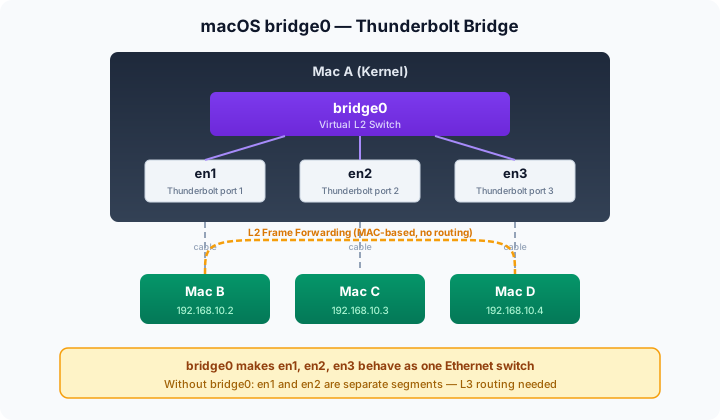
macOS bridge0
Earlier in the ifconfig output, we saw that bridge0 has en1, en2, and en3 as members. These three interfaces correspond to the Mac’s Thunderbolt ports. bridge0 acts as a virtual switch, grouping them into a single L2 segment.
For example, suppose Mac B and Mac C are each connected to Mac A (your computer) via Thunderbolt cables. Without bridge0, en1 and en2 would be completely separate network segments. For Mac B to send a packet to Mac C, IP-level routing (L3) would be needed.
But since bridge0 groups en1 and en2 together, traffic from Mac B to Mac C is forwarded directly within the bridge based on MAC addresses. It’s as if all three Macs were plugged into the same Ethernet switch. This is the core of L2 bridging — frames are delivered directly without going through IP.
Bridges in Kubernetes
The same concept appears in Kubernetes networking. CNI plugins like Flannel create a cni0 bridge on each worker node and connect the veth interfaces of Pods on that node to this bridge.
As a result, Pods on the same node communicate directly at L2 through the cni0 bridge. Just as macOS’s bridge0 unifies Thunderbolt-connected Macs into a single network, cni0 unifies Pods on the same node into a single network. The scale and purpose differ, but the principle is the same.
The Kernel Network Stack
Why Networking Lives in the Kernel
The kernel is the sole mediator between hardware and applications. The same principle applies to monitors, keyboards, and mice.
- NICs are hardware — Only the kernel can control them
- Multiple apps use the network simultaneously — Someone must arbitrate — The kernel’s job
- Routing, firewalling, and other shared policies — Must be applied consistently across all apps — The kernel handles it centrally
Linux Kernel Network Stack Architecture
We said that accessing the network requires going through the kernel. Applications reach the kernel layer through sockets, passing through various layers that correspond to the OSI model. Here’s what it looks like:
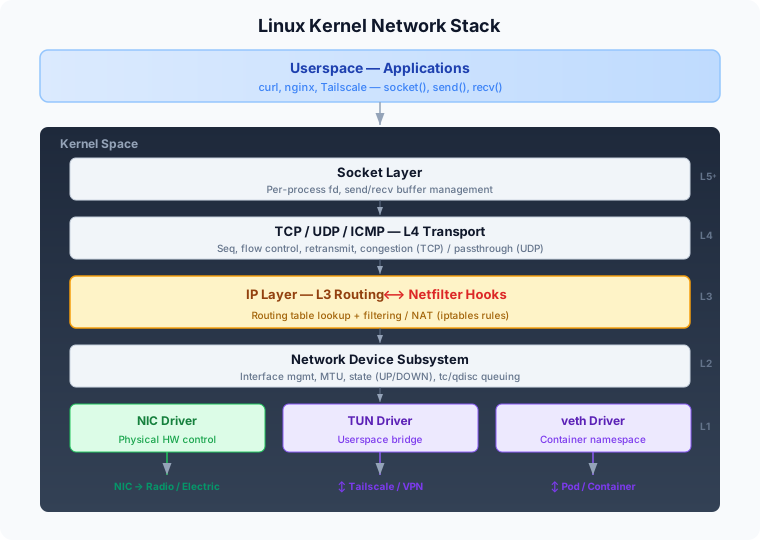
Each layer’s role:
- Socket layer: The only interface between apps and the kernel. Creates socket fds via
socket(), exchanges data viasend/recv. - Transport layer: For TCP — sequence numbers, flow control, retransmission, congestion control. For UDP — nearly passthrough.
- IP layer + Routing + Netfilter: Looks up the routing table to determine the outgoing interface and executes rules registered on Netfilter hooks.
- Network device subsystem: Manages interface lists, MTU, state (UP/DOWN), queuing disciplines (tc/qdisc).
- Device drivers: Hardware control (NIC driver), userspace bridging (TUN driver), container networking (veth driver).
When an application sends data over the network, it doesn’t go out as a single blob. As data descends through the layers, headers are added — IP header (20B), TCP header (20B), and so on. To avoid exceeding the MTU (typically 1500B) defined at L2, the data must be segmented in advance.
The unit TCP uses for this is MSS (Maximum Segment Size). MSS = MTU - IP header - TCP header, so in a standard environment that’s 1500 - 20 - 20 = 1460 bytes. No matter how large the data an application writes to a socket, TCP slices it into MSS-sized segments before passing it down.
macOS vs Linux
The network stack architecture covered in this article is based on the Linux kernel, but macOS has components that serve the same roles. The names and implementations differ, but the layered structure is essentially the same.
macOS XNU Kernel                  Linux Kernel
├─ ifnet (BSD Network Stack)      ├─ net_device (Linux network stack)
├─ pf (Packet Filter)             ├─ netfilter (+ iptables/nftables)
├─ utun (NetworkExtension)        ├─ tun/tap, wireguard module
└─ bridge (ifnet bridging)        └─ bridge, veth, vxlan module
Routing Tables — “Where Should This Packet Go?”
Earlier we looked at the kernel network stack’s structure. When an application writes data to a socket, it passes through TCP/UDP (L4) and reaches the IP layer (L3). The very first thing the kernel does at this IP layer is consult the routing table — deciding “which interface should this packet go out through, and where should it be directed?”
A routing table is a route information database managed by the kernel. It examines the destination IP address and selects the most specific matching route — an algorithm called Longest Prefix Match (LPM).
Viewing Routing Tables
Here’s how to view the routing table on each operating system.
Linux:
ip route show
default via 192.168.1.1 dev eth0          # Default gateway
192.168.1.0/24 dev eth0 scope link        # Local subnet delivered directly via eth0
10.0.0.0/8 via 10.1.1.1 dev wg0          # 10.x range goes through WireGuard tunnel
macOS:
netstat -rn                    # Full routing table
route -n get default           # Default gateway details
route -n get 10.0.5.3          # Route to a specific IP
Key Elements
Here are the key elements you need to know to interpret these commands.
| Element | Description |
|---|---|
| Destination | Target network (CIDR notation) |
| Gateway (via) | Next hop address (absent for directly connected networks) |
| Device (dev / Netif) | Outgoing network interface |
| Metric | Priority when multiple routes exist for the same destination |
| Scope | link (local subnet), global (remote), etc. |
Interpreting macOS Routing Tables
On macOS, running netstat shows various routes organized under the Internet section, like this:
Destination        Gateway            Flags               Netif Expire
default            192.168.20.1       UGScg                 en0
127                127.0.0.1          UCS                   lo0
192.168.20/23      link#14            UCS                   en0      !
192.168.20.1       ac:71:2e:f:ad:88   UHLWIir               en0   1198
224.0.0/4          link#14            UmCS                  en0      !
What each route means:
default → 192.168.20.1: If no other route matches, send everything to the gateway (router). All internet-bound traffic.127.0.0.0/8: Localhost traffic. Never leaves the machine — loops back onlo0.192.168.20/23: Local subnet. Direct communication viaen0without a gateway.192.168.20.1 → MAC address: ARP cache-linked host route. The Expire number is seconds until the ARP cache entry expires.224.0.0.0/4: Multicast range. mDNS (Bonjour — AirDrop, AirPlay), SSDP (UPnP), etc.
Flag Meanings
| Flag | Meaning |
|---|---|
U | Up (route is active) |
G | Via gateway (not directly connected) |
H | Host route (/32, a single specific host) |
S | Static (manually or system configured) |
L | Link-layer address present (MAC confirmed) |
W | Was cloned (duplicated from a C route) |
m | Multicast |
Packet Flow Examples
- Local subnet (ping
192.168.20.7): Subnet match → Direct delivery viaen0without gateway → ARP cache lookup for MAC → Ethernet frame sent - Internet (ping
8.8.8.8): No subnet match → Default route matches → Forward to gateway192.168.20.1→ Router handles internet routing
Netfilter and iptables — “How Should This Packet Be Handled?”
If the routing table decides “where to send,” Netfilter decides “should it be sent at all? Should it be modified?”
| Aspect | Routing Table | iptables / Netfilter |
|---|---|---|
| Core question | “Where to send?” | “Allow? Modify?” |
| Decision basis | Destination IP | Source/destination IP, port, protocol, state, etc. |
| Action | Route selection | Allow/block/NAT/packet modification |
They’re independent systems but closely intertwined. When Netfilter modifies a packet, the routing decision changes, and the routing decision determines which Netfilter hooks the packet traverses.
What iptables Does
iptables is a userspace tool that registers rules with the kernel’s Netfilter, telling it “when you see a packet like this, handle it like that.” The actual packet processing is performed by Netfilter inside the kernel. Once rules are registered, they persist in the kernel even after the iptables process exits.
iptables (userspace CLI)
    │
    │ Sends rules to kernel via netlink socket
    ▼
netfilter (kernel framework)
    ├─ PREROUTING hook: checks registered rules
    ├─ INPUT hook: checks registered rules
    ├─ FORWARD hook: checks registered rules
    ├─ OUTPUT hook: checks registered rules
    └─ POSTROUTING hook: checks registered rules
Netfilter’s 5 Hooks — Checkpoints in the Packet Flow
The Hook Concept
A hook is “an entry point where you can intercept a specific stage in a processing flow.” Netfilter places 5 checkpoints throughout the kernel’s packet processing pipeline — each one saying “pause here and run any registered rules.”
The Complete Packet Flow
When a packet arrives, the kernel always asks one fundamental question: “Is this packet destined for me, or not?” The answer determines the path, and the 5 hooks are placed at different points along these paths.
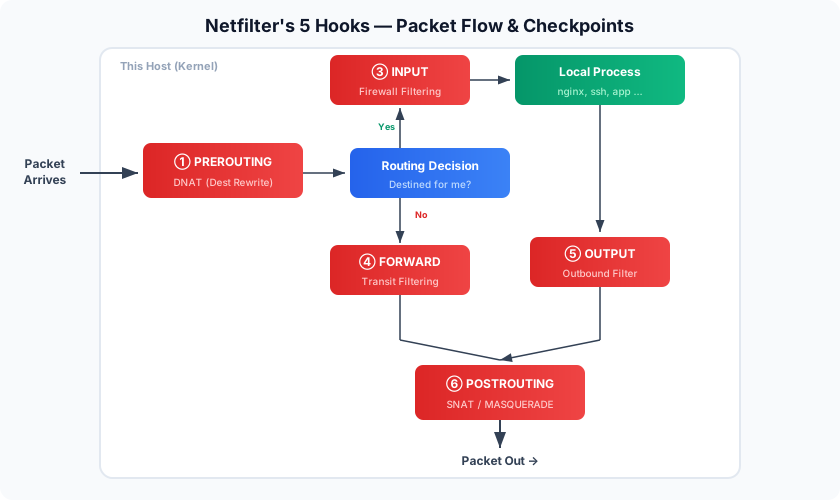
Each Hook’s Role
① PREROUTING — Right After Packet Arrival, Before Routing Decision
The very first hook a packet passes through after entering the kernel via the NIC. Changing the destination address here (DNAT) alters the subsequent routing decision.
# DNAT external 8080 → internal 192.168.1.10:80
iptables -t nat -A PREROUTING -p tcp --dport 8080 -j DNAT --to 192.168.1.10:80
② Routing Decision
Not a Netfilter hook but a kernel IP stack operation — essential for understanding the flow. The kernel examines the destination IP, queries the routing table, and splits into INPUT or FORWARD paths.
③ INPUT — Just Before Delivering to a Local Process
The core of server firewalling. Only applies to packets where this host is the final destination.
iptables -A INPUT -p tcp --dport 22 -j ACCEPT     # Allow SSH
iptables -A INPUT -p tcp --dport 80 -j ACCEPT     # Allow HTTP
iptables -A INPUT -j DROP                          # Block everything else
After passing INPUT, the kernel socket layer still checks “is any process listening on this port?” These two stages are independent — even if iptables ACCEPTs port 80, you’ll get RST if nginx isn’t running.
④ FORWARD — Packets Passing Through This Host
Only relevant when this host acts as a router. Typical cases: Docker container networking, VPN servers, Linux routers. IP forwarding is disabled by default on Linux — enable it with sysctl net.ipv4.ip_forward=1.
⑤ OUTPUT — Just Before Locally Generated Packets Leave
The hook for packets created by local processes, right after they enter the kernel network stack.
# Block outbound SMTP (port 25)
iptables -A OUTPUT -p tcp --dport 25 -j DROP
⑥ POSTROUTING — The Final Checkpoint Before Hitting the Wire
The last hook for all outbound packets. SNAT/MASQUERADE happens here.
# Translate internal source IPs to public IP
iptables -t nat -A POSTROUTING -s 192.168.1.0/24 -o eth0 -j MASQUERADE
Why Each Hook Is Placed Where It Is
| Hook | Key Reason |
|---|---|
| PREROUTING | Must influence the routing decision (DNAT) |
| INPUT | Must block before reaching the process |
| FORWARD | Can’t blindly forward others’ packets |
| OUTPUT | Must catch traffic that shouldn’t leave |
| POSTROUTING | Must translate addresses after all decisions are made |
These are the five essential Netfilter hooks to understand. Aside from FORWARD, the rest form natural pairs, which makes them easy to visualize and remember.
iptables Structure: Tables, Chains, and Rules
iptables has a three-tier hierarchy: Table > Chain > Rule.
Tables
Tables exist to separate different types of operations within a single hook.

filter — The most fundamental and commonly used table. Allows or blocks packets.
iptables -A INPUT -p tcp --dport 22 -j ACCEPT    # Allow SSH
iptables -A INPUT -j DROP                         # Block everything else
nat — Translates source or destination IP/port. Router NAT, port forwarding, and Docker container networking all happen here. The nat table only applies to the first packet of a connection — subsequent packets are automatically handled by conntrack.
# DNAT (destination translation) — PREROUTING
iptables -t nat -A PREROUTING -p tcp --dport 8080 -j DNAT --to 192.168.1.10:80

# MASQUERADE (source translation) — POSTROUTING
iptables -t nat -A POSTROUTING -s 192.168.1.0/24 -o eth0 -j MASQUERADE
mangle — Directly modifies IP header fields. TTL changes, TOS changes, MARK (kernel-internal tags), etc.
raw — Exempts specific packets from conntrack tracking. Used to prevent conntrack table overflow on high-traffic servers. Executes before all other tables.
Chains
A chain is “an ordered list of rules for a specific table at a specific hook.” Multiple tables’ chains execute at each hook in a fixed order (raw → mangle → nat → filter). Here’s which tables operate at which hooks (chains):
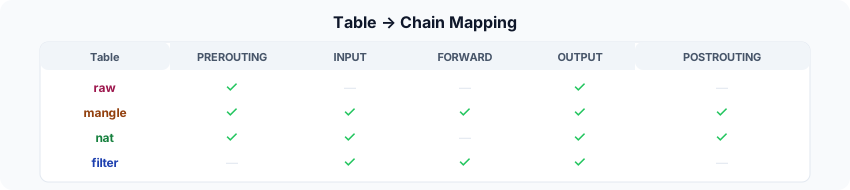
Custom chains can also be created for organization when rules grow numerous — similar to function calls in programming.
# Create and use a custom chain
iptables -N WEB_TRAFFIC
iptables -A WEB_TRAFFIC -p tcp --dport 80 -j ACCEPT
iptables -A WEB_TRAFFIC -p tcp --dport 443 -j ACCEPT
iptables -A WEB_TRAFFIC -j DROP

# Jump to this chain from INPUT
iptables -A INPUT -p tcp -j WEB_TRAFFIC
Rules
A rule consists of match conditions and a target. Rules within a chain are evaluated top-to-bottom, and a terminating target match ends evaluation immediately.

Terminating Targets — No further rules are evaluated:
| Target | Action |
|---|---|
ACCEPT | Allow the packet through |
DROP | Silently discard (sender waits until timeout) |
REJECT | Deny + send ICMP error response |
DNAT | Translate destination address |
SNAT / MASQUERADE | Translate source address |
Non-terminating Targets — Processing continues to the next rule:
| Target | Action |
|---|---|
LOG | Log to kernel log, then continue |
MARK | Set internal mark, then continue |
# LOG (non-terminating) then DROP (terminating) — log before blocking
iptables -A INPUT -p tcp --dport 22 -j LOG --log-prefix "SSH attempt: "
iptables -A INPUT -p tcp --dport 22 -s !10.0.0.0/8 -j DROP
If no rule matches, the chain’s default policy applies:
iptables -P INPUT DROP # Set INPUT chain default policy to DROP
A Packet’s Real Journey — The Weight of a Single curl
When you run curl https://api.example.com, a single HTTP request passes through these layers:
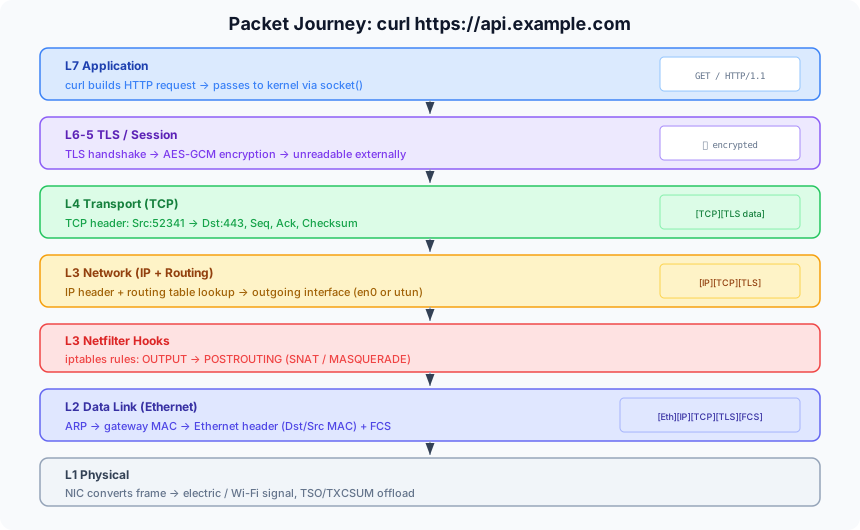
- L7 Application: curl generates the HTTP request string. Requests a socket fd from the kernel via
socket(). - L6-5 TLS/Session: TLS handshake completes. HTTP data is encrypted with AES-GCM.
- L4 Transport (TCP): TCP header attached — ephemeral source port, destination port 443, sequence number, checksum.
- L3 Network (IP): IP header attached + routing table lookup → outgoing interface determined.
- L3 Netfilter Hooks: iptables rules checked in OUTPUT → POSTROUTING order.
- L2 Data Link: ARP cache lookup for gateway MAC → Ethernet header + FCS attached.
- L1 Physical: NIC converts frames to electrical/Wi-Fi signals and transmits.
Once the packet becomes an electrical signal at L1, it reaches the router. The router performs NAT to translate the private IP to a public IP and sends it out to the ISP network. From there, it follows BGP routing between ISPs, passes through an IX (Internet Exchange), and reaches the ISP where the destination server lives, ultimately arriving at the server’s NIC.
The response travels back through this entire path in reverse. It goes up to L7 on the server, back down to L1, traverses the same physical path to reach your NIC, and the kernel strips headers from L1 through L7 until curl finally prints the HTTP response.
Practical Server Firewall Patterns
Most servers are final destinations rather than routers, so the INPUT chain is the core of server firewalling.
# Default policy: block all inbound
iptables -P INPUT DROP

# Allow packets from already-established sessions (stateful)
iptables -A INPUT -m conntrack --ctstate ESTABLISHED,RELATED -j ACCEPT

# Allow loopback
iptables -A INPUT -i lo -j ACCEPT

# Allow only SSH, HTTP, HTTPS
iptables -A INPUT -p tcp --dport 22 -j ACCEPT
iptables -A INPUT -p tcp --dport 80 -j ACCEPT
iptables -A INPUT -p tcp --dport 443 -j ACCEPT

# Everything else is blocked by the default policy (DROP)
This is fundamentally identical to setting inbound rules in an AWS Security Group — “Allow SSH on 22, Allow HTTP on 80.”
Appendix: Network Command Reference
macOS
# Routing
netstat -rn                              # Full routing table
route -n get default                     # Default gateway details
route -n get <IP>                        # Route to a specific IP

# Interfaces
ifconfig                                 # Interface list and IPs

# ARP / NDP
arp -a                                   # ARP table (IP ↔ MAC mapping)
ndp -a                                   # IPv6 Neighbor Discovery table

# DNS
scutil --dns                             # DNS configuration
networksetup -listallhardwareports       # Physical interface list

# Firewall (PF)
sudo pfctl -sr                           # Current active firewall rules
sudo pfctl -sa                           # Full state
Linux
# Routing
ip route show                            # Routing table
ip route get 10.0.0.5                    # Route to a specific IP
ip rule show                             # Policy Routing rules

# iptables rules (by table)
sudo iptables -L -v -n --line-numbers    # filter table
sudo iptables -t nat -L -v -n           # nat table
sudo iptables-save                       # Full rule dump

# nftables (iptables successor)
sudo nft list ruleset

# Filter for k8s-related rules only
sudo iptables-save | grep -i "KUBE\|FLANNEL\|CALICO"

# conntrack (NAT mapping state)
sudo conntrack -L -d 10.96.0.1

# Real-time packet tracing
sudo iptables -t raw -A PREROUTING -s 192.168.1.100 -j TRACE
dmesg -w | grep TRACE
macOS PF vs Linux iptables Syntax
# Linux iptables: block port 80
iptables -A INPUT -p tcp --dport 80 -j DROP

# macOS PF: same effect (/etc/pf.conf)
block in proto tcp from any to any port 80
Closing Thoughts
This article covered the networking fundamentals at the OS level. The goal was to break things down so you can fully understand the meaning behind basic shell commands like ifconfig, ip route, and iptables.
I’ve used these commands frequently myself, but never truly understood them in depth. Yet to appreciate why newer networking tools have emerged, you need to understand the limitations of the existing ones. For example, iptables evaluates rules within a chain sequentially, top to bottom. This is fine when you have a few dozen rules, but in a Kubernetes cluster where hundreds or thousands of Services each generate iptables rules, every packet must linearly scan this massive list — creating a serious performance bottleneck. This is exactly why tools like Cilium use eBPF to bypass Netfilter entirely.
In upcoming posts, I plan to explore topics built on top of these foundational network interfaces — things like VLANs, VXLAN, and the newer networking solutions that have emerged.