In the previous post, we covered the OS-level network stack — network interfaces, Ethernet frames, routing tables, and Netfilter/iptables. We followed exactly how packets move through the kernel.
This post goes one level up. We’ll dig into what Kubernetes builds on top of that OS network stack to make hundreds or thousands of Pods communicate as if they all live on the same network. The CNI contract, veth pairs as virtual cables, VXLAN as a tunnel — all of it comes down to composing the network primitives the OS already provides.
The Kubernetes Network Model
Kubernetes provides no networking implementation whatsoever. Instead, it declares three fundamental requirements:
- Every Pod must be able to communicate with every other Pod without NAT
- Every node must be able to communicate with every Pod without NAT
- The IP a Pod sees as its own must be the same IP other Pods see when communicating with it
In short: the entire cluster must appear as a single flat L3 network.
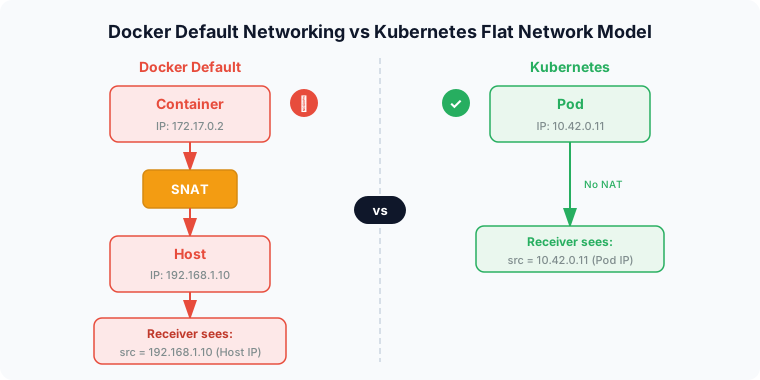
Why this model? Docker’s default networking gives us the answer. In Docker’s default mode, when a container talks to the outside world, it gets SNAT’d to the host IP. The receiver sees the host IP as the source — not the actual container IP. This breaks logging, security policies, and service discovery. Kubernetes eliminates this problem at the root by requiring a “NAT-free flat network.”
But the real world’s physical networks aren’t flat. Nodes can be on different subnets, there are routers in between, and cloud VPCs have no idea Pod IPs even exist. Bridging this gap between the ideal and reality is the job of the CNI plugin.
CNI (Container Network Interface) — A Contract, Not an Implementation
CNI is a CNCF project that defines an interface spec for setting up and tearing down network connectivity for containers. The key insight is that CNI is a contract, not a networking solution. Whether to use veth, VXLAN, or BGP — the CNI spec says nothing about any of that. All of it is left to the plugin implementation.
What the Spec Defines
Binary interface: A CNI plugin is an executable located at /opt/cni/bin/. The container runtime (containerd, CRI-O) directly execs this binary. It receives JSON configuration on stdin and returns results on stdout — a simple, clean interface.
Operations: Just four — ADD (connect a container to the network), DEL (disconnect), CHECK (verify state), and VERSION.
The CNI Call Flow When a Pod Is Created
Here’s what actually happens when a Pod is created and the network gets set up:
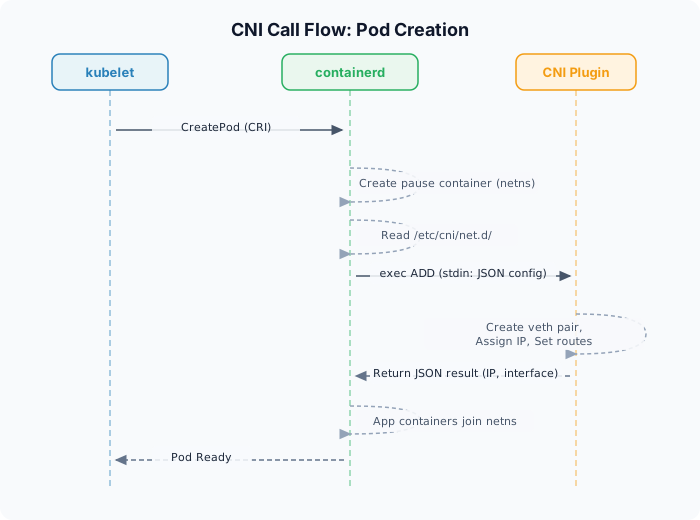
1. kubelet → requests Pod creation from containerd via CRI
2. containerd → creates pause container to establish the network namespace
3. containerd → reads CNI config file from /etc/cni/net.d/
4. execs CNI binary → calls ADD
5. CNI plugin → creates veth pair, assigns IP, configures routing
6. returns result (assigned IP, interface info) as JSON
7. actual application containers join this namespace
Step 2’s pause container is important. Even if application containers restart, the network namespace lives on in the pause container — so the Pod IP is preserved.
CNI Chaining
Multiple CNI plugins can be chained for a single Pod. For example, calico → bandwidth → portmap: the main plugin sets up the network, and subsequent plugins add QoS or port mapping on top.
Same-Node Pod Communication
When a Pod is created, the kernel creates a dedicated network namespace for it. Everything covered in the previous post — network interfaces, routing tables, iptables rules — all exists independently per namespace. A Pod literally has its own private network world.
To connect an isolated namespace to the host, we use a veth pair — a virtual Ethernet cable. One end (eth0) lives inside the Pod namespace; the other end (vethXXXX) lives in the host namespace. A packet pushed into one side comes out the other — it’s a pipe inside the kernel.
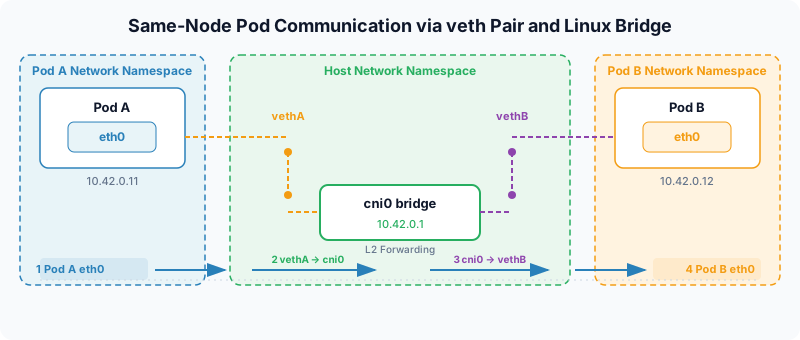
With Flannel, the host-side veth ends are all connected to a Linux bridge called cni0.
Pod A → Pod B communication path (same node):
- Pod A generates a packet (src: 10.42.0.11, dst: 10.42.0.12)
- Pod A’s eth0 → out through vethA into the host namespace
- The cni0 bridge looks up its MAC address table and forwards to vethB
- vethB → Pod B’s eth0
This is pure L2 bridge behavior — zero encapsulation overhead. The MAC-based forwarding of Ethernet frames covered in the previous post works exactly as-is.
Cross-Node Pod Communication — The Core Problem
Within a single node, one bridge is enough. But communicating with a Pod on a different node is a completely different story.
[Node 1: 192.168.1.10]              [Node 2: 192.168.1.20]
  Pod A: 10.42.0.11                   Pod C: 10.42.1.15
  Pod B: 10.42.0.12                   Pod D: 10.42.1.16
When Pod A (10.42.0.11) wants to send a packet to Pod C (10.42.1.15):
- 10.42.1.15 is an address that only makes sense inside Node 2
- The physical network’s routers have no knowledge of the Pod CIDR (10.42.0.0/16)
- The moment the packet leaves Node 1, the physical network has no idea where to send it
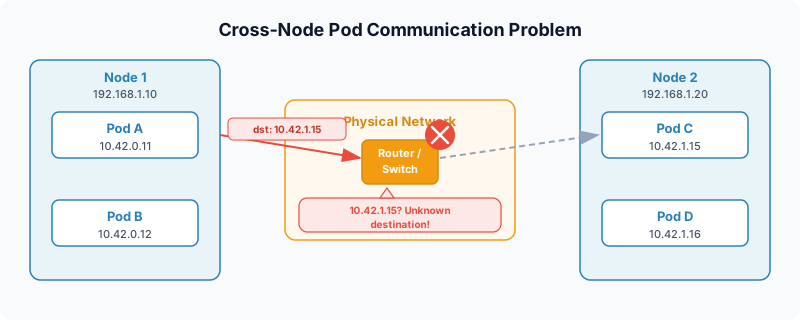
There are two broad approaches to solving this:
| Approach | Core Idea | Representative Implementations |
|---|---|---|
| Overlay | Wrap the original packet in addresses the physical network understands | Flannel VXLAN, Cilium Geneve |
| Underlay | Teach the physical network to route Pod address ranges directly | Calico BGP |
VXLAN — Tunneling L2 Frames Over UDP
The Core Idea
VXLAN (Virtual eXtensible LAN) is conceptually simple: wrap L2 Ethernet frames inside UDP packets and deliver them over an L3 network.
This is the same encapsulation pattern as WireGuard — which we covered in a previous series as “wrapping IP packets in UDP” — except that what’s being wrapped isn’t an IP packet but an entire Ethernet frame.
VXLAN was originally designed to make physically separated networks appear as a single L2 segment. It was created to break through the 4,096-ID VLAN limit in data centers, and has since been repurposed for Kubernetes overlay networks.
Encapsulation Structure
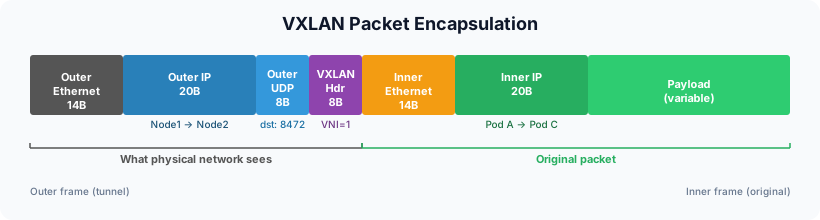
From the outside in: outer Ethernet header (src=Node1 MAC, dst=Node2 MAC), outer IP (src=192.168.1.10, dst=192.168.1.20), outer UDP (dst=8472, the default Linux VXLAN port), VXLAN header (VNI=1), then inside: inner Ethernet (Pod A MAC → Pod C MAC), inner IP (10.42.0.11 → 10.42.1.15), Payload.
From the physical network’s perspective, this packet is just “a plain UDP packet from Node 1 to Node 2.” It neither knows nor needs to know that there’s a complete Ethernet frame inside.
Overhead Calculation
| Component | Size |
|---|---|
| Outer IP header | 20 bytes |
| Outer UDP header | 8 bytes |
| VXLAN header | 8 bytes |
| Inner Ethernet header | 14 bytes |
| Total | 50 bytes |
In an MTU 1500 environment with VXLAN, the inner packet can only use 1450 bytes. This 50-byte overhead is exactly why Flannel sets the Pod interface MTU to 1450.
Compared to WireGuard:
| Encapsulation | Overhead | Encryption | Effective MTU (at 1500) |
|---|---|---|---|
| VXLAN | 50 bytes | None | 1450 |
| WireGuard | 60 bytes | ChaCha20-Poly1305 | 1440 |
| VXLAN + WireGuard | 110 bytes | Yes | 1390 |
The VXLAN Header and VNI
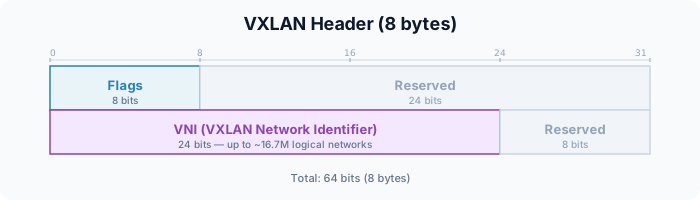
The VNI (VXLAN Network Identifier) is 24 bits, allowing approximately 16.7 million logical networks — a massive leap over VLAN’s 12-bit (4,096) limit. Flannel typically uses VNI=1.
VTEP and FDB — VXLAN’s Address Learning Mechanism
To perform VXLAN encapsulation, you need to know “which node should this Pod’s packet be sent to?” That’s what VTEPs and FDBs are for.
VTEP (VXLAN Tunnel End Point)
In a Flannel environment, the flannel.1 device created on each node is the VTEP. This device performs encapsulation and decapsulation.
FDB (Forwarding Database)
A VTEP manages the mapping of “which inner MAC address maps to which outer IP” using an FDB (Forwarding Database).
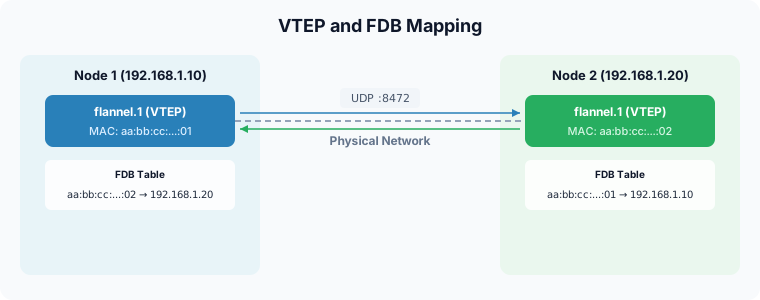
# Check the FDB
bridge fdb show dev flannel.1
# aa:bb:cc:dd:ee:ff dst 192.168.1.20 self permanent
# → "The VTEP with this MAC address is at 192.168.1.20"
This maps conceptually to WireGuard’s cryptokey routing:
| WireGuard | VXLAN | |
|---|---|---|
| Mapping | IP range → public key (peer) | MAC → VTEP IP |
| Managed by | Tailscale coordination server | Flannel flanneld |
BUM Traffic and Flannel’s Solution
BUM (Broadcast, Unknown unicast, Multicast) — in a regular L2 network, a switch floods all ports when it doesn’t know the destination MAC. In VXLAN, “all ports” means “all remote VTEPs,” which creates serious scalability problems.
The pure VXLAN spec propagates BUM traffic via multicast groups, but most cloud environments don’t support multicast.
Flannel’s solution: flanneld prepopulates FDB and ARP entries from the control plane. When a node joins the cluster, flanneld directly injects information into every node’s FDB and ARP tables.
# ARP entries managed automatically by Flannel
ip neigh show dev flannel.1
# 10.42.1.0 lladdr aa:bb:cc:dd:ee:ff PERMANENT
# → pre-populated by flanneld; no actual ARP broadcast needed
This is the pattern of “solving a data plane problem by lifting it to the control plane.” It’s structurally identical to how a Tailscale coordination server pre-distributes peer information.
Full Flannel + VXLAN Cross-Node Communication Flow
Let’s tie together everything we’ve covered. Here’s the complete path for a packet from Pod A (Node 1, 10.42.0.11) to Pod C (Node 2, 10.42.1.15).
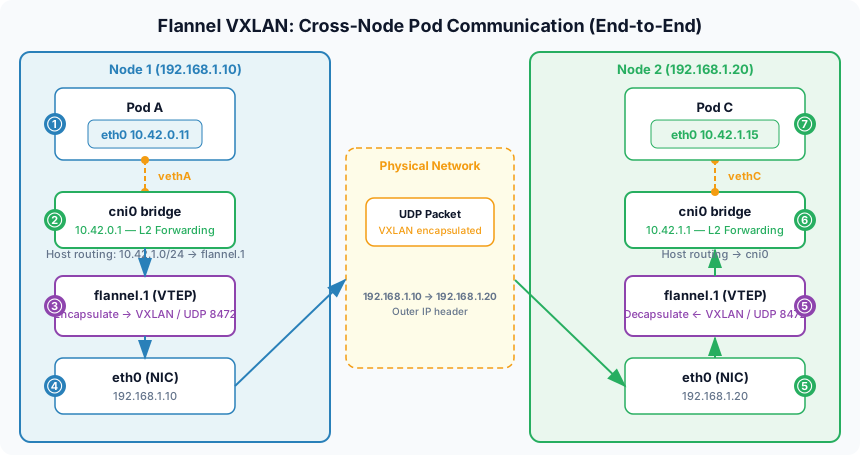
Node 1 (Sending)
Step 1 — Routing decision inside the Pod: Pod A’s namespace routing table is simple.
default via 10.42.0.1 dev eth0
10.42.1.15 isn’t on the local subnet, so it takes the default route out through eth0 (the Pod-side end of the veth).
Step 2 — Arrives in host namespace, routing decision: The key entry in the host routing table:
10.42.0.0/24 dev cni0                      # Local Pod range → bridge
10.42.1.0/24 via 10.42.1.0 dev flannel.1   # Node 2's Pod range → VXLAN device
Destination 10.42.1.15 matches 10.42.1.0/24 → forwarded to the flannel.1 device.
Step 3 — VXLAN encapsulation:
When the packet enters flannel.1 (the VTEP), the kernel VXLAN module:
- Looks up FDB → “the 10.42.1.0/24 range lives on Node 2 (192.168.1.20)”
- Wraps the original packet in an inner Ethernet frame
- Adds VXLAN header (VNI=1)
- Adds outer UDP header (dst port=8472)
- Adds outer IP header (src=192.168.1.10, dst=192.168.1.20)
Step 4 — Physical network transit: Sent via the host’s physical NIC (eth0). The physical network treats it as an ordinary UDP packet.
Node 2 (Receiving)
Step 5 — VXLAN decapsulation: The kernel sees UDP port 8472 and hands it to the VXLAN module → strips the outer headers and extracts the inner Ethernet frame.
Step 6 — Host routing → Pod delivery:
The decapsulated packet (dst=10.42.1.15) matches the 10.42.1.0/24 dev cni0 route and is forwarded through the cni0 bridge → to Pod C’s veth.
Step 7 — Pod C receives: The source IP Pod C sees is 10.42.0.11 — Pod A’s actual IP. No NAT, so the Kubernetes network model is satisfied.
Overlay vs. Underlay
| Overlay (Flannel VXLAN, etc.) | Underlay (Calico BGP) | |
|---|---|---|
| Physical network requirements | None — works anywhere | BGP support required |
| Encapsulation overhead | 50 bytes (VXLAN) | None |
| Suitable environments | Cloud, heterogeneous infrastructure | On-premises, BGP-capable environments |
| Performance | CPU cost for encapsulation | Maximum performance |
| Debugging | Double headers in packet captures | Same as normal routing |
Most managed Kubernetes offerings (EKS, GKE, AKS) and lightweight distributions (k3s) default to overlay. The convenience of not needing to touch the physical network is worth more than a small performance overhead in most cases.
NIC Hardware Offloading
VXLAN is a mature standard, and most server-grade NICs support hardware offloading:
ethtool -k eth0 | grep vxlan
# tx-udp_tnl-segmentation: on        # NIC handles encapsulation
# tx-udp_tnl-csum-segmentation: on   # NIC handles checksums too
TSO (TCP Segmentation Offload) and GRO (Generic Receive Offload) work on encapsulated packets as well, so the actual CPU overhead is far lower than the theoretical numbers suggest.
CNI Plugin Comparison: Calico, Cilium, and eBPF
We’ve used Flannel as our example throughout — it handles only overlay network setup, with no NetworkPolicy, no BGP, and no L7 processing. Production environments need more, which is where Calico and Cilium come in.
Calico — Mature Architecture Built on Netfilter
Calico leverages Linux’s native routing stack and iptables directly. From the previous post, recall netfilter’s five hooks — Calico primarily inserts rules into the FORWARD chain to implement NetworkPolicy.
Three cross-node communication modes:
| Mode | Encapsulation | Overhead | Notes |
|---|---|---|---|
| BGP | None | 0 bytes | Advertises Pod routes directly to the physical network |
| VXLAN | L2 over UDP | 50 bytes | Used in cloud environments |
| IPIP | IP-in-IP | 20 bytes | Lighter than VXLAN but can have compatibility issues |
Felix (a DaemonSet) manages iptables rules and routes on each node, while BIRD serves as the BGP daemon. Calico fully supports the Kubernetes standard NetworkPolicy spec, with extensions available via its own CRDs like GlobalNetworkPolicy.
Cilium — Bypassing Netfilter with eBPF
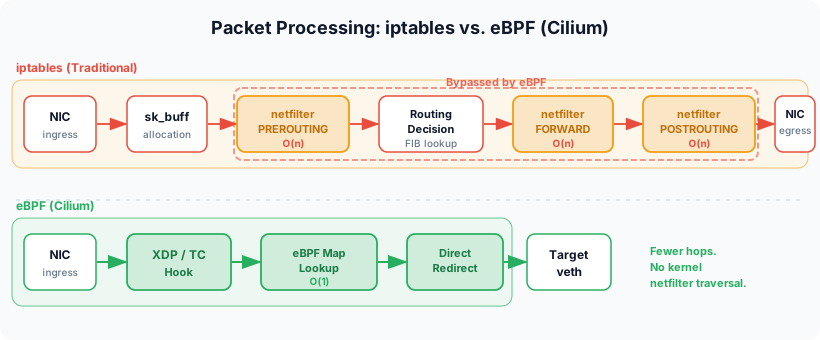
Cilium’s core idea is bypassing netfilter entirely.
eBPF (extended Berkeley Packet Filter) lets you run sandboxed programs inside the kernel without modifying kernel source. Cilium attaches eBPF programs directly to TC (Traffic Control) hooks and XDP (eXpress Data Path) hooks — both of which run far earlier in the processing pipeline than netfilter.
Traditional path (iptables):
  NIC → netfilter PREROUTING → routing → netfilter FORWARD → NIC

Cilium path (eBPF):
  NIC → XDP/TC eBPF program → direct redirect → target Pod veth
While iptables does a linear scan (O(n)) through thousands of rules, Cilium uses eBPF maps (hash tables) for O(1) lookups to evaluate policy. With 1,000 Services, iptables may need up to 1,000 comparisons in the worst case; Cilium needs a single hash lookup.
Additional capabilities Cilium provides:
- Full kube-proxy replacement: Service VIP → backend Pod mapping stored in eBPF maps, with DNAT performed in the TC hook
- Identity-based security: Policy applied via numeric identities derived from labels, not IPs. When a Pod’s IP changes, the same label means the same policy
- Hubble: Network flow observability collected via eBPF at L7 (HTTP, gRPC, Kafka, DNS) — no sidecar required, all at the kernel level
Structural Comparison
| Aspect | Calico (iptables) | Cilium (eBPF) |
|---|---|---|
| Packet processing | Netfilter hooks | TC/XDP eBPF hooks |
| Policy lookup | O(n) linear scan | O(1) hash lookup |
| Policy updates | Full chain rewrite | Atomic map entry update |
| kube-proxy | Separate component | Fully replaced |
| Security model | IP-based | Identity (label) based |
| L7 processing | None | Envoy built-in + Hubble |
| Kernel requirement | No special requirement | 4.19+ (5.10+ recommended) |
A single Cilium deployment can replace Flannel (overlay) + Calico (policy) + kube-proxy (service load balancing). That said, the kernel version requirement and the different debugging toolset (bpftool, cilium monitor) are operational considerations worth keeping in mind.
Appendix: Environment Inspection Commands
# Check CNI binaries
ls /opt/cni/bin/

# Check CNI configuration
ls /etc/cni/net.d/
cat /etc/cni/net.d/*.conflist

# Check which CNI is running
kubectl get pods -n kube-system | grep -E "calico|flannel|cilium"

# Inspect the VXLAN device
ip -d link show flannel.1

# Check the FDB
bridge fdb show dev flannel.1

# Check ARP entries
ip neigh show dev flannel.1

# Check VXLAN offload
ethtool -k eth0 | grep vxlan

# Check Pod interface MTU (1450 means VXLAN 50-byte overhead is applied)
kubectl exec <pod> -- ip link show eth0

# Check k3s startup options
cat /etc/systemd/system/k3s.service