In the previous post, we covered Java and Spring’s multithreaded architecture — the traditional model where each request gets its own thread, with locks and synchronization mechanisms to manage shared resources. But in the same server-side space, there’s a camp built on a completely opposite philosophy: JavaScript and Node.js.
JavaScript is a single-threaded, non-blocking, asynchronous concurrent language. No locks, no semaphores, no deadlocks. So how does a single-threaded language handle tens of thousands of concurrent connections? And is Node.js actually single-threaded or multi-threaded? Why does this debate never seem to settle?
This post weaves three topics into one narrative. First, we’ll analyze how JavaScript’s event loop implements asynchronous processing in a single-threaded environment. Then we’ll answer the “single-threaded or multi-threaded?” debate about Node.js — with libuv as the key witness. Finally, we’ll trace the evolution of async programming paradigms from callbacks all the way to async/await.
1. The JavaScript Event Loop
To understand whether JavaScript is single-threaded or multi-threaded, you first need to understand what the event loop actually is.
The Structure of the V8 Engine
The V8 engine that runs JavaScript is a C++ JavaScript engine built by Google. It’s embedded in Google Chrome to execute JavaScript, and because it’s open source, Node.js uses it too.
Here’s how the V8 engine works:
- JavaScript source code is handed off to the Parser.
- The Parser converts the source code into an AST (Abstract Syntax Tree).
- The AST is passed to the Ignition interpreter, which compiles it into bytecode.
- As the bytecode runs, frequently executed code is sent to the TurboFan compiler to be compiled into optimized machine code.
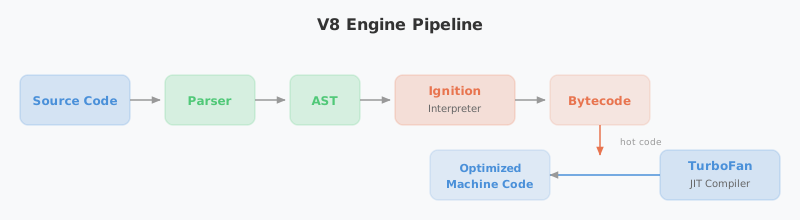
That’s the V8 engine’s execution pipeline in a nutshell.
A Single Call Stack and Asynchronous Processing
“One thread == one call stack == one thing at a time” - Philip Roberts
The V8 engine has a single Call Stack. By design, it can only process one thing at a time — it’s a single-threaded language in the most literal sense. So how does a single-threaded language deliver performance comparable to multi-threaded systems?
The secret lies in the cooperation between Web APIs, the Event Loop, and the Callback Queue.
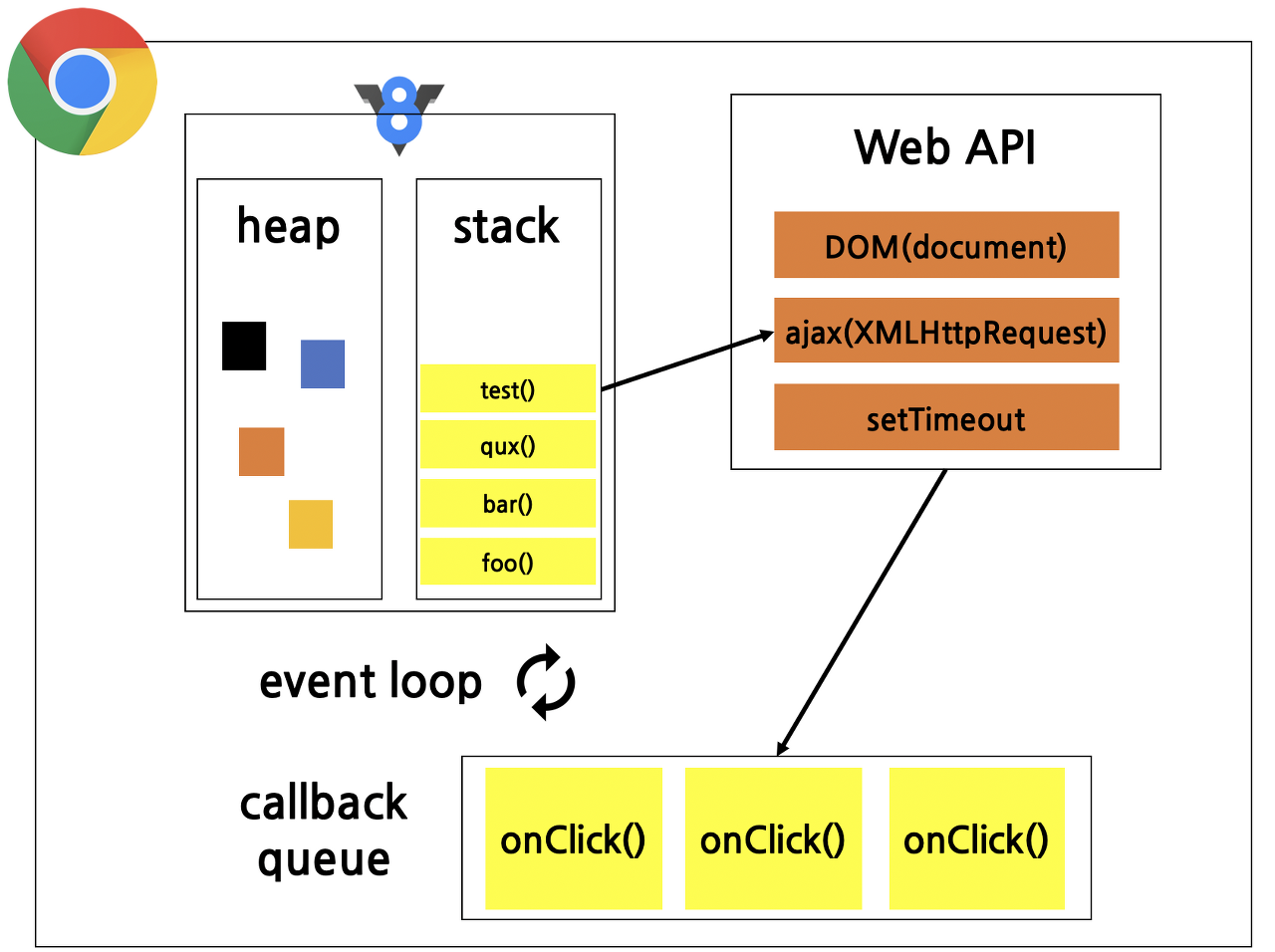
The diagram above shows the JavaScript runtime environment inside the Chrome browser. You can see the V8 logo alongside a single heap and a single call stack — the JavaScript that V8 executes uses one call stack.
Alongside V8’s Call Stack, the Web APIs, Callback Queue, and Event Loop all work together. Async-capable operations (like setTimeout or network requests) are handled by Web APIs, and once they complete, their callbacks are sent to the Callback Queue. The Event Loop then watches for this and pushes functions into the Call Stack when it’s empty.
In short, in the browser, Web APIs and the Callback Queue enable asynchronous behavior, letting single-threaded JavaScript punch well above its weight when it comes to performance.
Synchronous Execution Flow
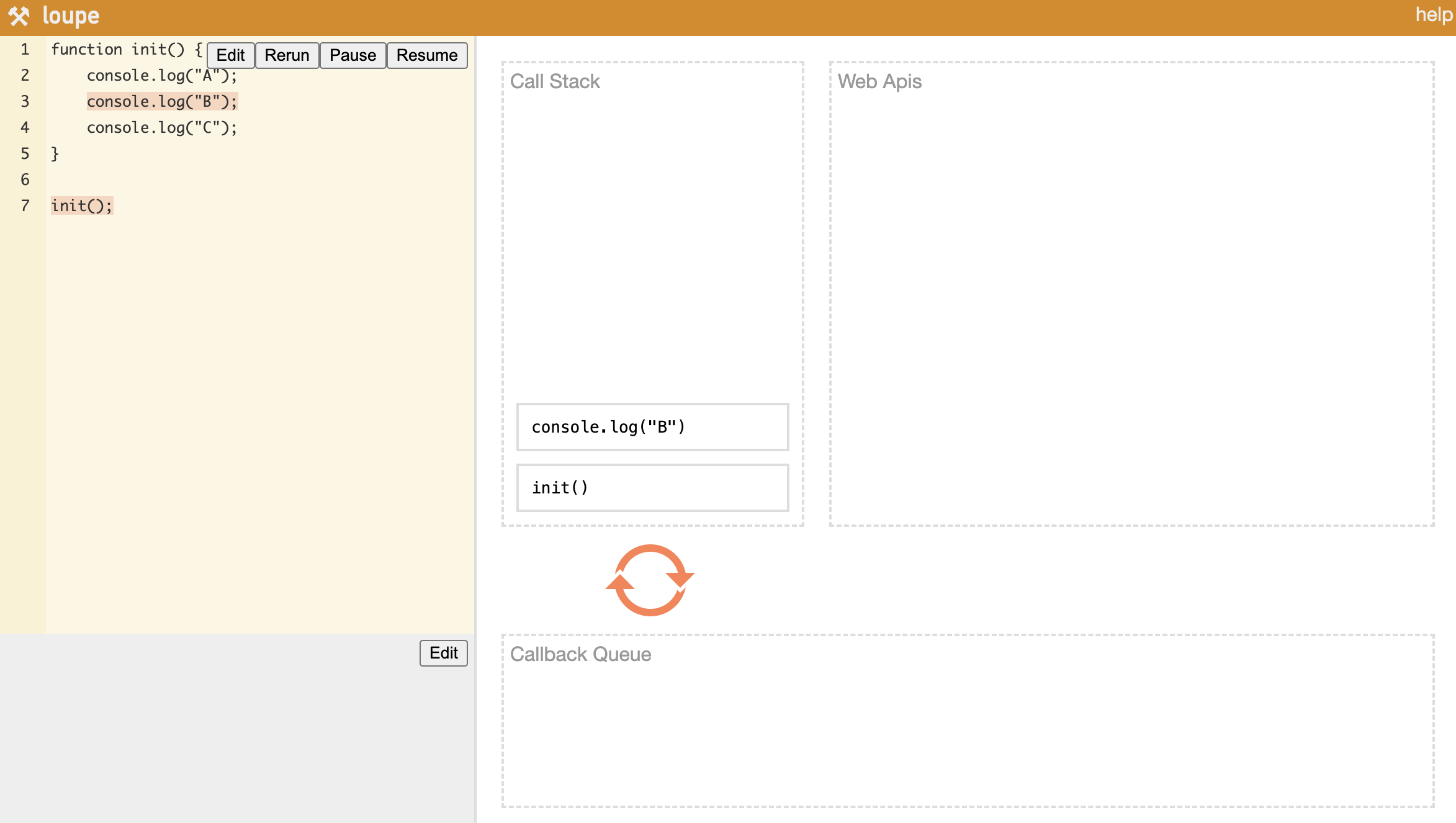
Let’s start with the simple case — no async functions. When you call init(), the console.log calls inside it get pushed onto the Call Stack one by one, executed immediately, and once everything is done, init itself is popped off the stack and execution ends.
Asynchronous Execution Flow
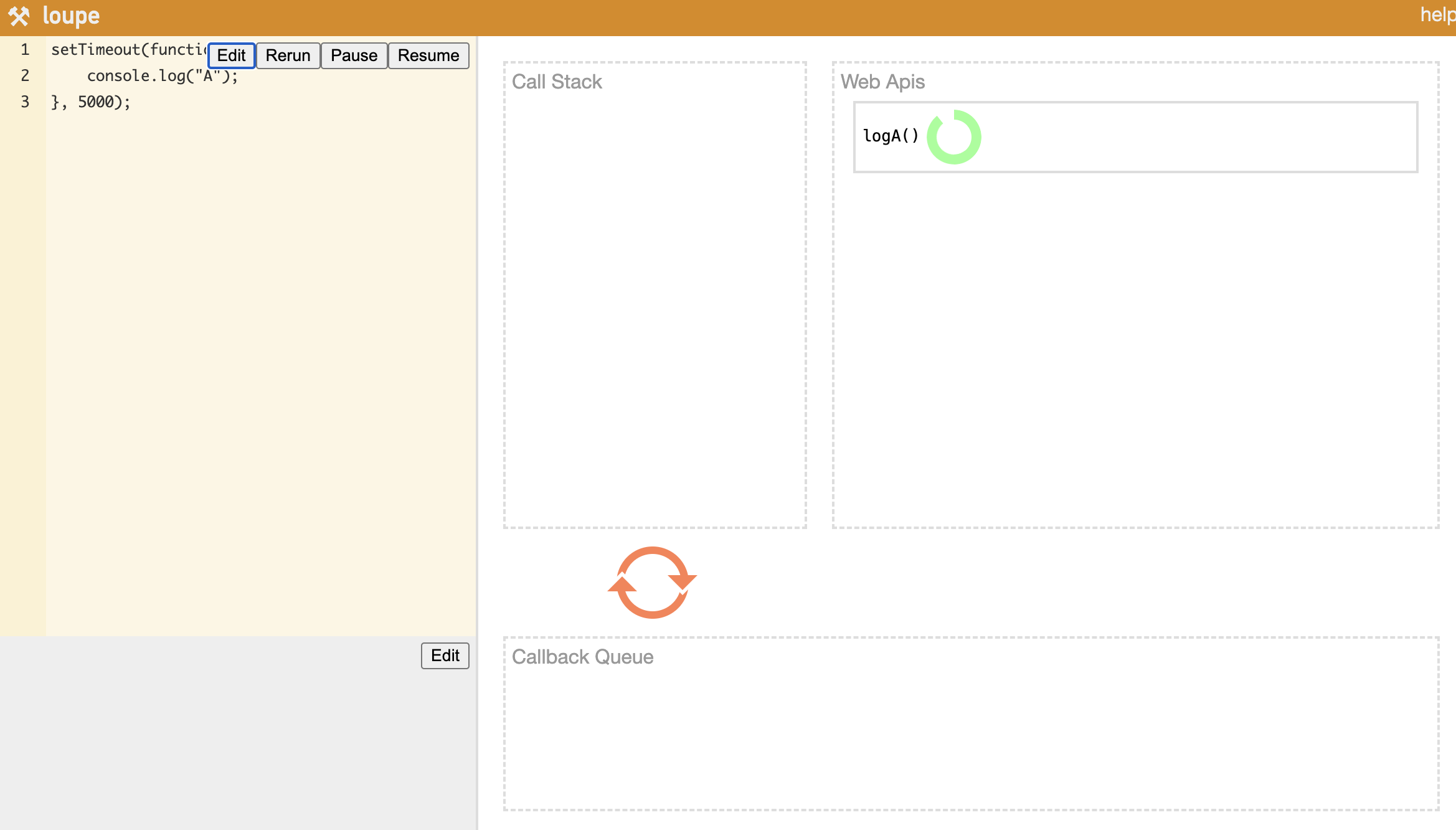
setTimeout is the classic async example. Async functions like setTimeout first get pushed onto the Call Stack, then moved over to Web APIs. Once the timer fires inside Web APIs, the callback function is placed into the Callback Queue, and the Event Loop picks it up and pushes it onto the Call Stack one at a time.
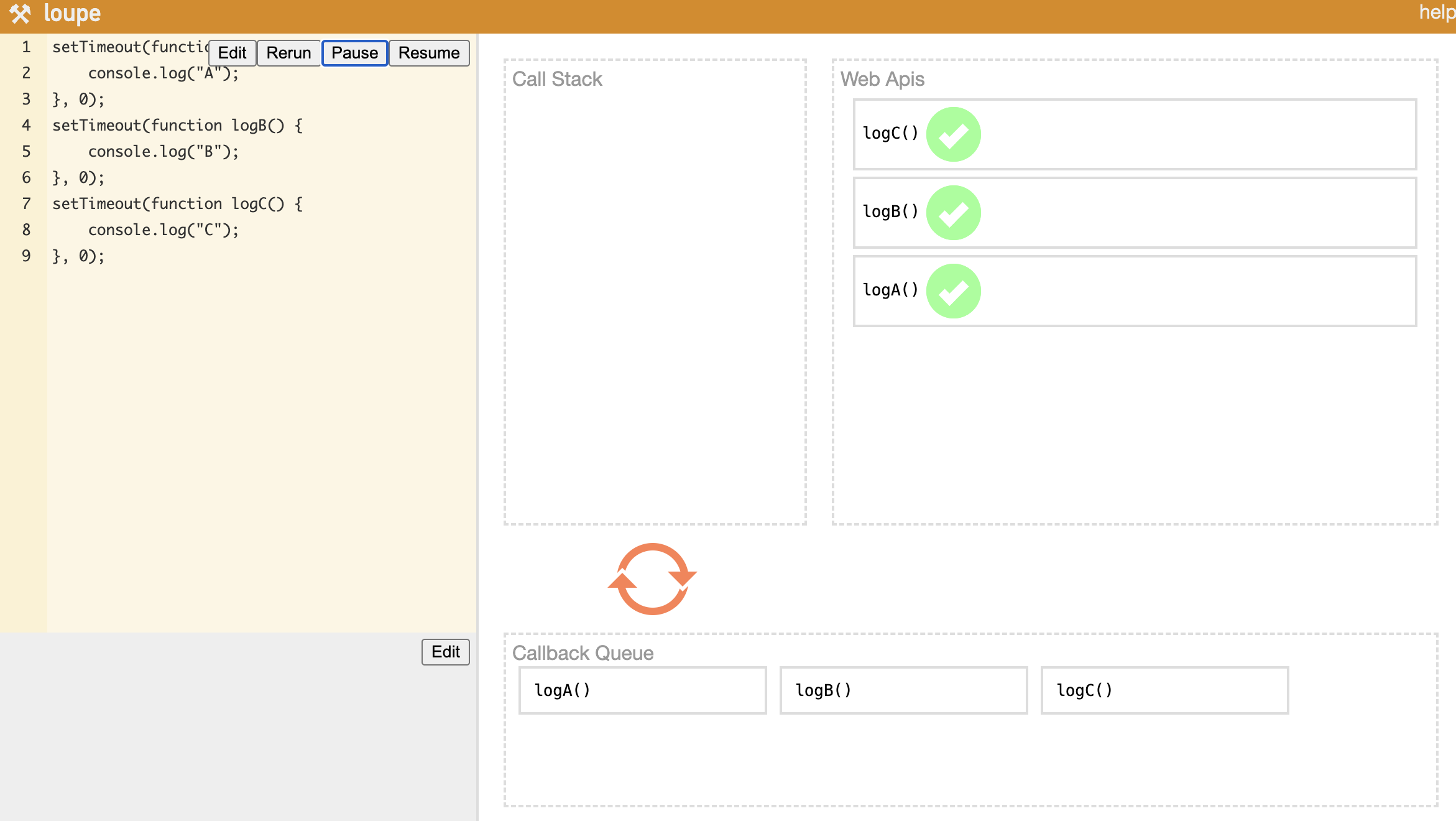
When you have multiple setTimeout calls, the code is scanned line by line — each one goes onto the Call Stack and then gets handed off to Web APIs. As each callback completes, it lands in the Callback Queue, and the Event Loop delivers them to the Call Stack one by one. This interplay between the Call Stack, Web APIs, Callback Queue, and Event Loop is what allows single-threaded JavaScript to hold its own against multi-threaded systems.
2. Node.js Threading Model
Now we know the event loop is what gives single-threaded JavaScript its async superpowers. But when this mechanism moves out of the browser and into server-side territory, things get more interesting. How did Node.js bring this architecture over, and is it actually single-threaded?
What Is Node.js?
From the Node.js official website:
Node.js is an open-source, cross-platform JavaScript runtime environment. Node.js runs the V8 JavaScript engine, the core of Google Chrome, outside of the browser.
The key phrase is “outside of the browser.” JavaScript was originally born for the web — created by Brendan Eich at Netscape Communications in 1995. The V8 engine, which runs JavaScript alongside HTML and CSS inside a web browser, was freed from that constraint and made to run independently: that’s Node.js.
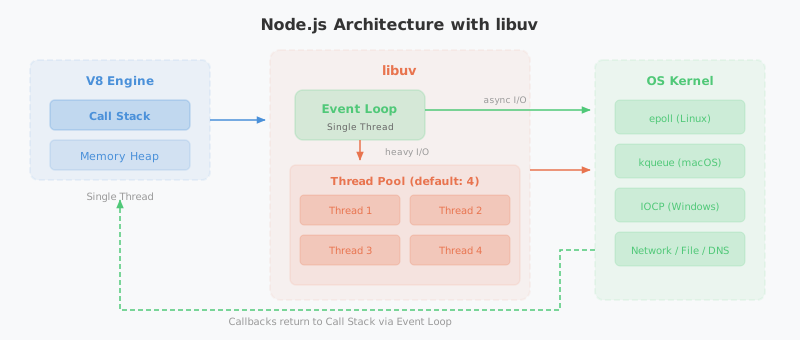
JavaScript on its own is hard to run in isolation. In the browser it runs with Web APIs alongside it. Node.js replaces Web APIs with libuv, using it to push async performance to its limits.
Single-Threaded or Multi-Threaded?
JavaScript itself is unambiguously single-threaded from birth. But whether Node.js is single-threaded or multi-threaded depends on your perspective. The short answer: “both are correct” — it depends on what you’re looking at.
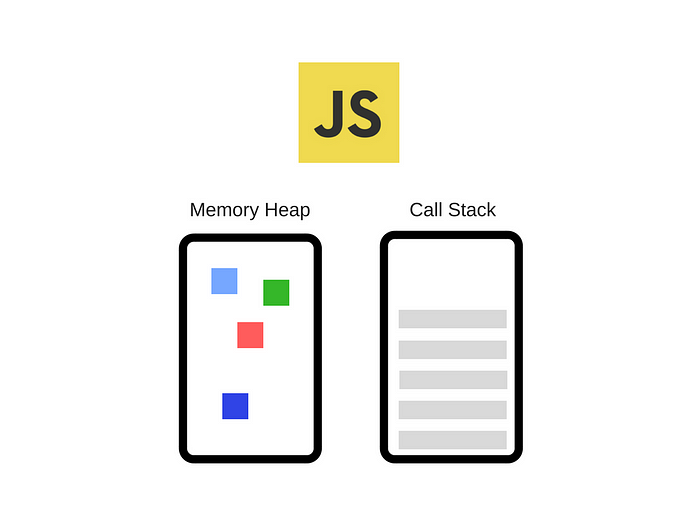
JavaScript has a single Call Stack and processes tasks on it one at a time — that’s the definition of single-threaded. The Memory Heap stores variables and other data, and function calls stack up in the Call Stack as they execute.
Blocking vs. Non-Blocking, Synchronous vs. Asynchronous
To really understand the event loop, you need to grasp the difference between blocking/non-blocking and synchronous/asynchronous.
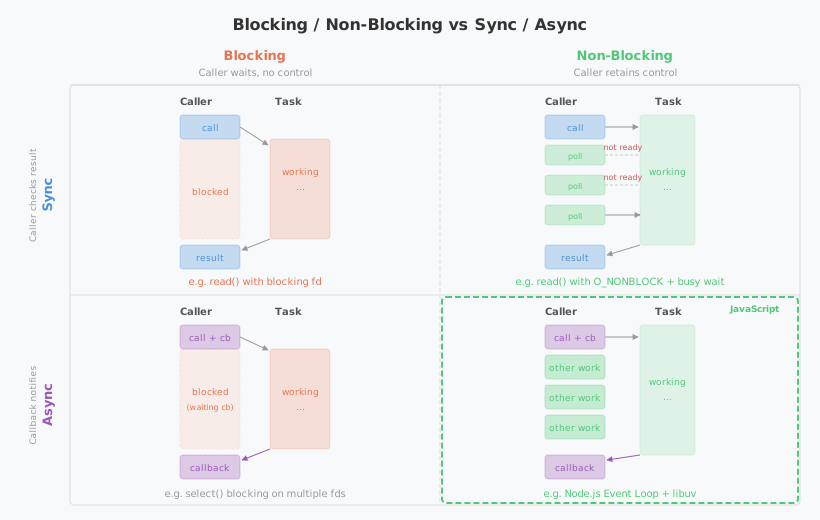
- Blocking vs. Non-Blocking: Can you do other work while a function is executing? Blocking means you have to wait for the function to finish; non-blocking means you can keep going. The key is who holds control.
- Synchronous vs. Asynchronous: Who checks whether the task is done? Synchronous means the caller checks directly; asynchronous means a callback delivers the result.
The reason JavaScript can be single-threaded yet competitive with multi-threaded systems is precisely because it operates in a non-blocking, asynchronous fashion. You kick off a task with a callback, move on to other work, and when the async task completes and the callback fires, you handle the result then.
The Difference Between an Async Function and an Async Operation
In JavaScript, the async and await keywords each play a specific role:
- async: Marks a function as an async function — it automatically returns a
Promise. - await: Waits for an async operation to complete before proceeding.
The important nuance: it’s not the async function itself that runs separately — it’s the async operations inside it that get offloaded.
async function example() {
    console.log("1. Function start");

    setTimeout(() => {
        console.log("2. Async operation (setTimeout) complete");
    }, 2000); // runs after 2 seconds

    console.log("3. Function end");
}
Here, setTimeout() is the async operation. Run this and you’ll see 1 and 3 printed first, then 2 after two seconds. The key is that execution doesn’t stop at setTimeout — the rest of the code runs immediately.
Using await lets you wait for an async operation to finish:
function delay(ms) {
    return new Promise(resolve => setTimeout(resolve, ms));
}

async function example() {
    console.log("1. Function start");

    await delay(2000); // wait 2 seconds (async operation)

    console.log("2. Runs after 2 seconds");
}

example();
console.log("3. Other work after calling the function");
When example() hits the await, it pauses internally — but because JavaScript is non-blocking, "3. Other work after calling the function" prints first. Only after two seconds does "2. Runs after 2 seconds" appear.
If you try to access the result of an async function without await, you’ll get back an unresolved Promise object:
async function example() {
    return delay(2000); // no await
}

console.log(example()); // Promise { <pending> }
How the Event Loop Actually Works
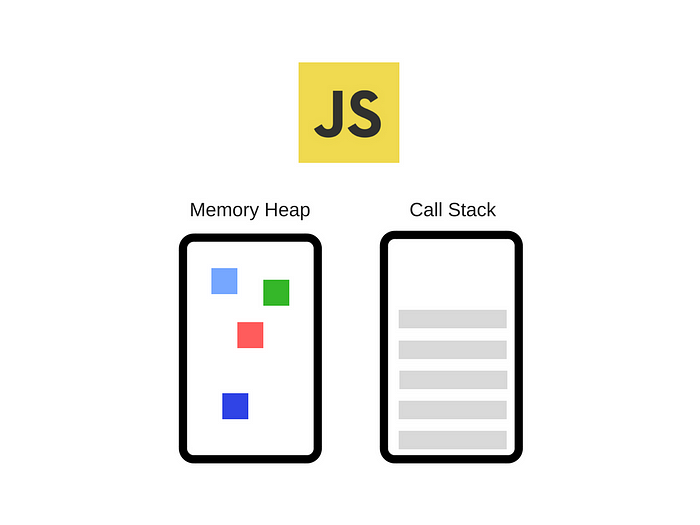
When JavaScript runs, it processes functions from the Call Stack one at a time on a single thread. To operate non-blocking and asynchronously, it needs something else to handle async work on its behalf.
- Browser environment: Web APIs handle async operations using multiple threads behind the scenes.
- Node.js environment: libuv handles async operations with multi-threaded support.
This is exactly where the argument for calling JavaScript multi-threaded comes from. Web APIs and libuv both operate with multiple threads internally — and like Java’s thread pool, libuv has its own thread pool. The default thread pool size is 4, and it can be tuned up to 1024 via the UV_THREADPOOL_SIZE environment variable.
Callback Queue: Task Queue and Microtask Queue
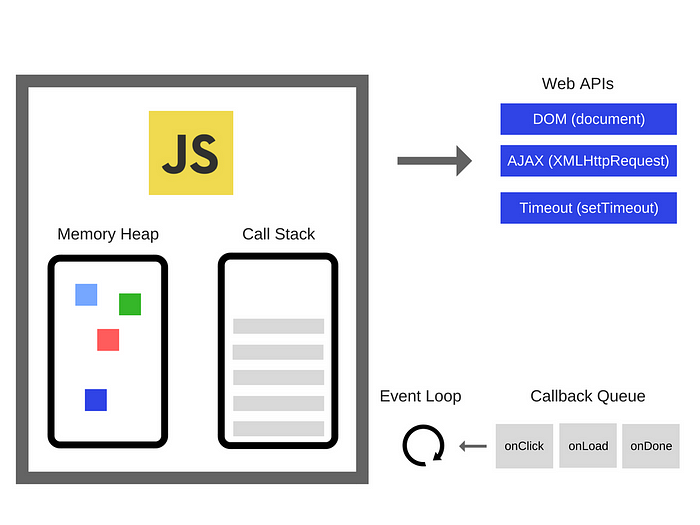
Every function executed in JavaScript first enters the Call Stack. Async functions among them call into Web APIs (or libuv), and when they complete, their callbacks are placed into the Callback Queue.
The Callback Queue is actually not one queue — it’s two:
- Task Queue: Where callbacks from
setTimeout,setInterval, and similar APIs wait after completing. - Microtask Queue: Where
Promise.then()andMutationObservercallbacks go.
The Microtask Queue has higher priority. It’s drained first on every cycle of the event loop, and it typically contains important async logic that needs to run as soon as possible.
process.nextTick() in Node.js
In Node.js, there’s one more thing to know. Callbacks registered with process.nextTick() run even before the Microtask Queue. More precisely: at each phase transition in the event loop, the nextTickQueue is drained first, then the Microtask Queue, and finally the Task Queue.
setTimeout(() => console.log("1. Task Queue (setTimeout)"), 0);

Promise.resolve().then(() => console.log("2. Microtask Queue (Promise)"));

process.nextTick(() => console.log("3. nextTickQueue (process.nextTick)"));

console.log("4. Call Stack (synchronous code)");

// Execution order:
// 4. Call Stack (synchronous code)
// 3. nextTickQueue (process.nextTick)
// 2. Microtask Queue (Promise)
// 1. Task Queue (setTimeout)
Synchronous code runs first, followed by process.nextTick(), then Promise, then setTimeout. The priority order:
| Priority | Queue | Representative API |
|---|---|---|
| 1 (highest) | nextTickQueue | process.nextTick() |
| 2 | Microtask Queue | Promise.then(), queueMicrotask() |
| 3 | Task Queue | setTimeout(), setInterval(), setImmediate() |
Overusing
process.nextTick()can cause I/O starvation — the event loop gets stuck and never advances to the next phase. The Node.js docs recommend preferringqueueMicrotask()orsetImmediate()in most cases.
The 6 Phases of the Event Loop
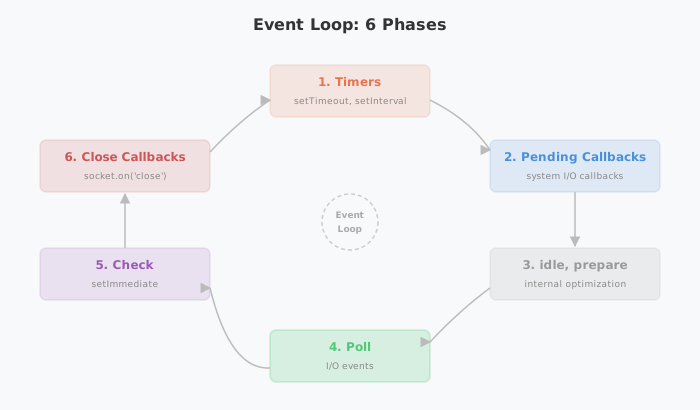
When we say “the event loop goes through a cycle,” the loop refers to six distinct phases it rotates through. Each phase determines the execution order for async tasks:
- Timers: Executes
setTimeout()andsetInterval()callbacks. - Pending Callbacks: Executes deferred I/O callbacks from the previous cycle (e.g., TCP errors).
- idle, prepare: Internal housekeeping for libuv optimizations.
- Poll: Waits for and processes pending I/O events.
- Check: Executes
setImmediate()callbacks. - Close Callbacks: Executes close event callbacks like
socket.on('close', callback).
In the browser, a browser engine like Chromium implements the event loop. In Node.js, libuv plays that role.
Node.js Is Officially Single-Threaded
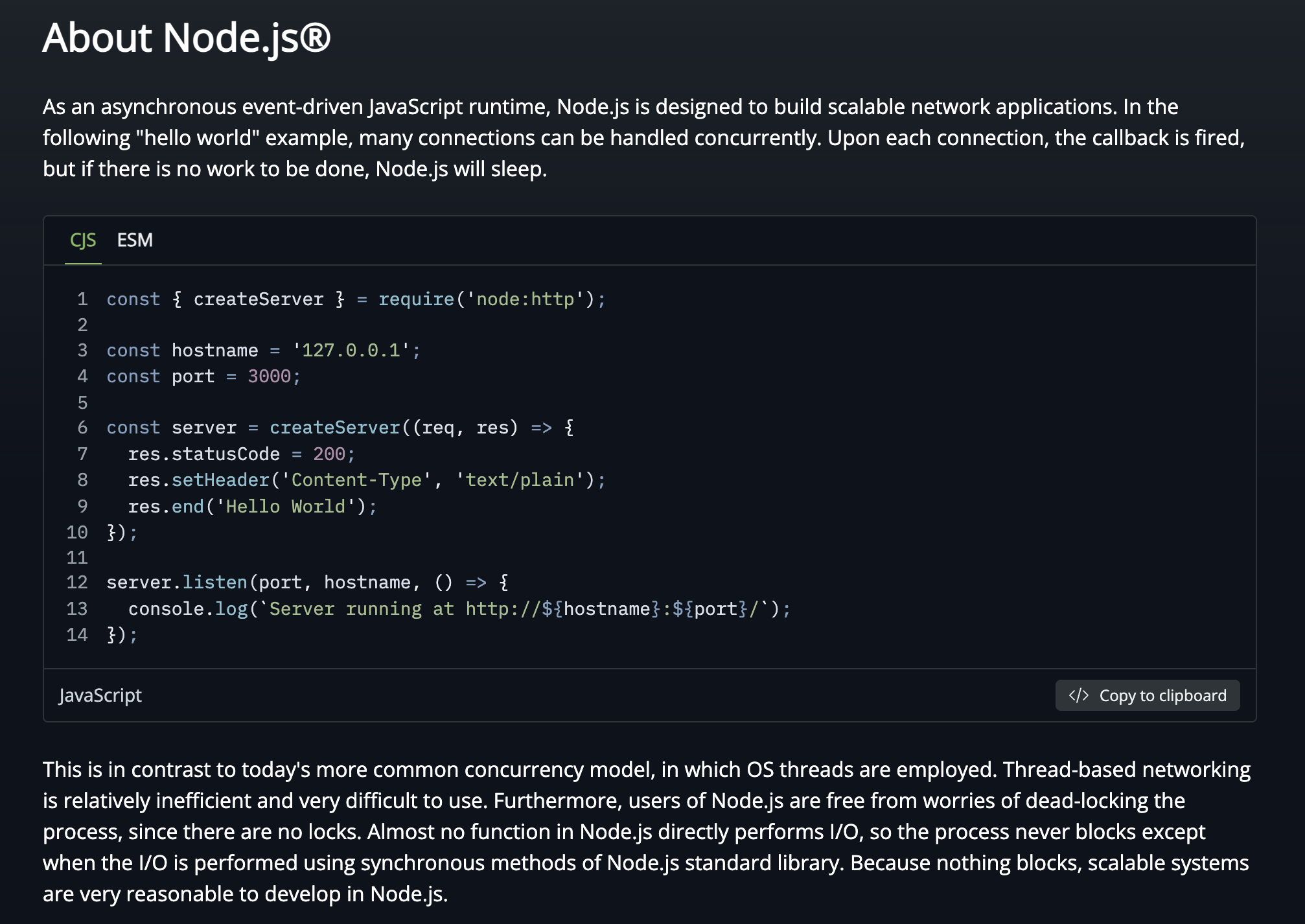
Looking at the Node.js official docs (About Node.js), Node.js explicitly positions itself as single-threaded. The most decisive evidence: there are no locks for Node.js users.
In a multi-threaded environment, you need synchronization primitives — spinlocks, semaphores, mutexes — to prevent deadlocks when multiple threads access shared resources concurrently. Node.js has none of that. That’s about as strong a signal as you can get that it’s single-threaded.
For a deeper look at the difference between blocking and non-blocking, check out the Node.js docs: Overview of Blocking vs Non-Blocking.
To summarize:
| Perspective | Reasoning |
|---|---|
| Single-threaded | JavaScript itself runs on a single call stack with no locking mechanism. |
| Multi-threaded | libuv has a thread pool and handles async I/O on multiple threads. |
Neither is wrong. The accurate description is: the main execution thread (JavaScript code itself) is single-threaded, while libuv — which assists with async I/O — is multi-threaded.
The Achilles’ Heel of Single-Threading: CPU-Intensive Work
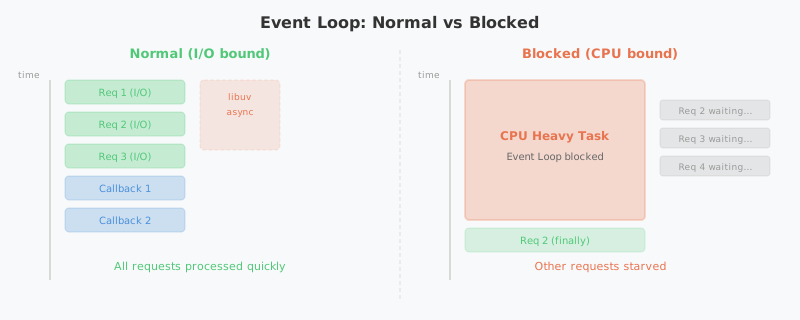
The Node.js event loop excels at I/O, but it has a critical weakness with CPU-intensive tasks. Because the event loop runs on a single thread, if one task hogs the CPU, the event loop itself blocks — and every other request grinds to a halt.
// Example of blocking the event loop
app.get("/heavy", (req, res) => {
    // 5 billion iterations — every other request waits during this
    let sum = 0;
    for (let i = 0; i < 5_000_000_000; i++) {
        sum += i;
    }
    res.json({ result: sum });
});

app.get("/health", (req, res) => {
    // This won't respond until /heavy finishes
    res.json({ status: "ok" });
});
Parsing large JSON payloads, resizing images, cryptographic operations, and complex regex matching are all classic CPU-intensive tasks. When these run directly on the event loop, the entire server becomes unresponsive until they finish.
Worker Threads: Node.js’s Multi-Threading Solution
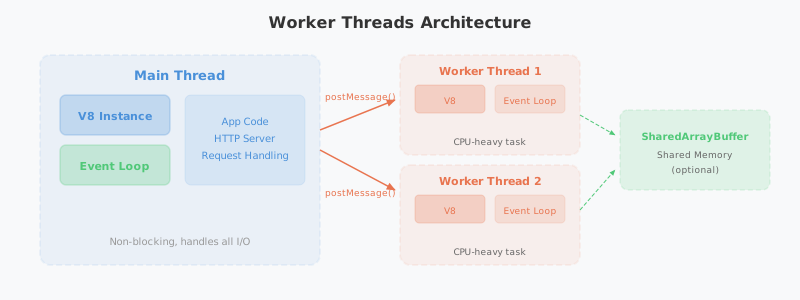
Introduced in Node.js 10.5, Worker Threads are the official answer to this problem. They let you run JavaScript in a separate thread from the main thread, and each Worker gets its own independent V8 instance and event loop.
// main.js — main thread
const { Worker } = require("worker_threads");

app.get("/heavy", (req, res) => {
    const worker = new Worker("./heavy-task.js");

    worker.on("message", (result) => {
        res.json({ result }); // respond when the Worker finishes
    });

    worker.on("error", (err) => {
        res.status(500).json({ error: err.message });
    });
});
// heavy-task.js — Worker thread
const { parentPort } = require("worker_threads");

let sum = 0;
for (let i = 0; i < 5_000_000_000; i++) {
    sum += i;
}

parentPort.postMessage(sum); // send result back to main thread
Key characteristics of Worker Threads:
- Each Worker has its own independent V8 instance, so it doesn’t block the main thread’s event loop.
- Memory can be shared between threads via
SharedArrayBuffer. - Threads communicate via
postMessage()— similar to the Web Worker pattern in browsers. - Unlike Java threads, no locks are needed for shared resources — because it uses message passing.
Cluster Module: Leveraging Multi-Core CPUs
While Worker Threads add threads within a single process, the Cluster module takes a different approach — it forks the entire process to take advantage of multi-core CPUs.
const cluster = require("cluster");
const http = require("http");
const os = require("os");

if (cluster.isPrimary) {
    const numCPUs = os.cpus().length;
    console.log(`Primary process ${process.pid} is running`);
    console.log(`Forking ${numCPUs} workers...`);

    // Fork one worker per CPU core
    for (let i = 0; i < numCPUs; i++) {
        cluster.fork();
    }

    cluster.on("exit", (worker) => {
        console.log(`Worker ${worker.process.pid} died. Restarting...`);
        cluster.fork(); // automatically restart dead workers
    });
} else {
    // Each worker process shares the same port
    http.createServer((req, res) => {
        res.writeHead(200);
        res.end(`Handled by worker ${process.pid}\n`);
    }).listen(8000);
}
How the Cluster module works:
- The Primary process spawns multiple Worker processes via
fork(). - Each Worker process is a fully independent Node.js instance (V8 engine + event loop).
- Incoming network requests are distributed to Workers using round-robin load balancing at the OS level.
- If a Worker dies, the Primary detects it and can spawn a new one.
In practice, most teams reach for a process manager like PM2 instead of managing the Cluster module directly. One command — pm2 start app.js -i max — automatically spawns as many processes as there are CPU cores, handles zero-downtime restarts, and manages logs.
| Approach | Unit | Memory | Communication | Primary Use Case |
|---|---|---|---|---|
| Worker Threads | Thread | Shareable (SharedArrayBuffer) | postMessage() | CPU-intensive computation |
| Cluster | Process | Isolated | IPC (inter-process communication) | Multi-core utilization, horizontal scaling |
3. The Evolution of Async Programming Paradigms
So far we’ve looked at the internal mechanics of how the event loop and libuv handle async work. But how have developers expressed that asynchrony in code? We touched on async/await earlier — now let’s trace the full arc of why and how JavaScript’s async patterns evolved alongside the language itself.
Callbacks: Where It All Started
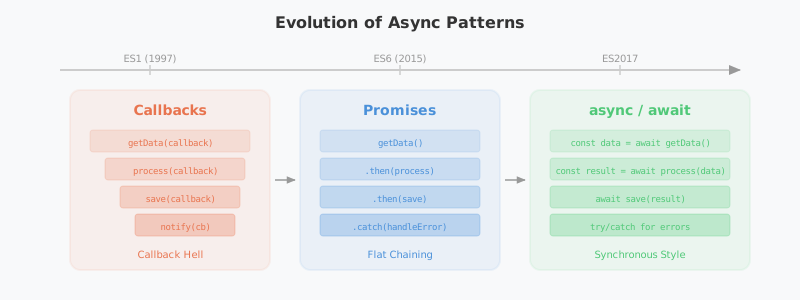
The original form of async programming in JavaScript was the callback function — you pass a function ahead of time, and it gets called when the async work completes.
function fetchData(callback) {
    setTimeout(() => {
        callback(null, { id: 1, name: "marsboy" });
    }, 1000);
}

fetchData((error, data) => {
    if (error) {
        console.error("Error:", error);
        return;
    }
    console.log("Data:", data);
});
Simple cases are intuitive enough, but when async operations nest inside each other, you get the infamous Callback Hell:
// Callback Hell in action
getUser(userId, (error, user) => {
    getOrders(user.id, (error, orders) => {
        getOrderDetails(orders[0].id, (error, details) => {
            getShippingInfo(details.shippingId, (error, shipping) => {
                console.log("Shipping info:", shipping);
                // deeper and deeper indentation...
            });
        });
    });
});
Readability collapses, and error handling has to be repeated at every level.
Promises: Enter Chaining
Promises, introduced in ES6 (2015), were designed to escape Callback Hell. A Promise represents the eventual result of an async operation, and you control the async flow through chaining with .then() and .catch().
function fetchUser(userId) {
    return new Promise((resolve, reject) => {
        setTimeout(() => {
            resolve({ id: userId, name: "marsboy" });
        }, 1000);
    });
}

fetchUser(1)
    .then(user => getOrders(user.id))
    .then(orders => getOrderDetails(orders[0].id))
    .then(details => getShippingInfo(details.shippingId))
    .then(shipping => console.log("Shipping info:", shipping))
    .catch(error => console.error("Error:", error));
The deep nesting flattens out, and a single .catch() handles errors across the entire chain.
A Promise has three possible states:
- Pending: The operation hasn’t completed yet (
Promise { <pending> }). - Fulfilled: The operation completed successfully.
- Rejected: The operation failed.
async/await: Writing Async Code Like Sync Code
async/await, introduced in ES2017, is syntactic sugar over Promises that lets you write async code as if it were synchronous.
async function getShippingInfoForUser(userId) {
    try {
        const user = await fetchUser(userId);
        const orders = await getOrders(user.id);
        const details = await getOrderDetails(orders[0].id);
        const shipping = await getShippingInfo(details.shippingId);

        console.log("Shipping info:", shipping);
        return shipping;
    } catch (error) {
        console.error("Error:", error);
    }
}
Even though this is async code, it reads top-to-bottom like synchronous code. Error handling with try/catch follows the same familiar pattern.
Comparing the Async Paradigms
| Approach | Introduced | Strengths | Weaknesses |
|---|---|---|---|
| Callbacks | ES1 (1997) | Simple and intuitive | Callback hell, complex error handling |
| Promises | ES6 (2015) | Chaining, unified error handling | .then() chains can still get long |
| async/await | ES2017 | Synchronous readability, try/catch support | Top-level usage limited (resolved in ESM modules) |
4. Java/Spring vs. Node.js: When to Use What
We’ve covered the event loop’s structure, Node.js’s threading model, and the evolution of async paradigms. Now let’s return to the question we started with. Compared to the Java/Spring multithreaded model from the previous post, which do you actually pick, and when?
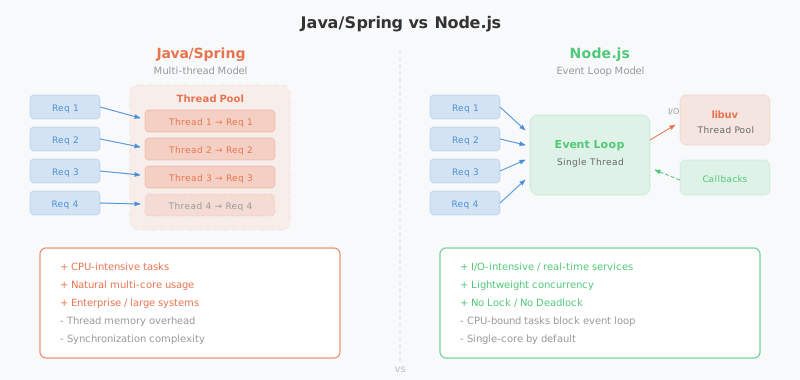
The two models are built on fundamentally different philosophies. It’s not about which one is “better” — it’s about choosing the right tool for the problem at hand.
Structural Differences at a Glance
| Java/Spring | Node.js | |
|---|---|---|
| Concurrency model | Multi-threaded (thread-per-request) | Single-threaded event loop |
| I/O handling | Threads wait on blocking I/O | libuv handles I/O non-blocking and async |
| CPU utilization | Multi-core naturally via multiple threads | Single-core by default; scale with Cluster/Worker |
| Synchronization | Locks, synchronized, semaphores required | No locks needed (message passing) |
| Memory | Stack memory allocated per thread | Lightweight — one event loop handles everything |
| Ecosystem | Enterprise, finance, large-scale systems | Real-time services, API servers, microservices |
Where Node.js Shines
- I/O-intensive services: Chat servers, real-time notifications, API gateways — anything that maintains a large number of concurrent connections while hitting databases and external APIs. A single thread can handle tens of thousands of simultaneous connections.
- Rapid prototyping: npm’s rich package ecosystem and JavaScript’s flexibility make it ideal when you need to ship an MVP fast.
- Real-time bidirectional communication: For WebSocket-based real-time services (game servers, collaboration tools), the event loop’s non-blocking nature is a genuine advantage.
- SSR (Server-Side Rendering): JavaScript on both frontend and backend unifies the stack — the foundation of full-stack frameworks like Next.js.
Where Java/Spring Shines
- CPU-intensive services: Heavy data processing, complex business logic, batch jobs. Multiple threads naturally leverage multiple CPU cores.
- Enterprise systems: Transaction management, complex domain models, legacy system integration — Spring’s mature ecosystem is a natural fit for financial and public-sector systems.
- Type safety at scale: Static typing and compile-time verification pay dividends in large team collaboration and long-term maintenance.
- Virtual Threads (Java 21): Java 21’s virtual threads bring lightweight concurrency — previously one of Node.js’s selling points — into the Java ecosystem. The per-thread memory overhead drops dramatically, making Java significantly more competitive for I/O-intensive services.
The lines are blurring. Node.js handles CPU work via Worker Threads; Java handles lightweight concurrency via Virtual Threads. Both are evolving to cover each other’s weaknesses. Technology selection should be less about “which is better?” and more about “which fits our team’s strengths and our service’s characteristics?”
Closing Thoughts
JavaScript was born to bring dynamic behavior to web pages. It started life with the constraint of being single-threaded, but it overcame that limitation through a distinctive combination of the event loop and non-blocking async programming.
Node.js took JavaScript out of the browser and made it viable on the server side, using libuv to handle async I/O on multiple threads — while still presenting the developer with the simplicity of a single-threaded model. No locks, no deadlocks: developers don’t have to worry about complex synchronization problems. Even the Achilles’ heel of CPU-intensive work is being addressed through Worker Threads and the Cluster module, and Node.js continues to expand its territory.
The Java/Spring multithreaded model from the previous post and Node.js’s event loop model represent two completely different solutions to the same problem of concurrency. Neither is superior — the most important thing is choosing the tool that fits your service’s characteristics and your team’s capabilities.
The fact that a language Brendan Eich threw together in 10 days back in 1995 still sits at the center of the web ecosystem 30 years later is genuinely remarkable. The arc from callbacks to Promises to async/await is proof of just how much it has grown.
Appendix: A Brief History of Web Browsers
V8, Chromium, and WebKit came up frequently throughout this post. To understand where these engines came from — and why JavaScript was born as a single-threaded language for the browser — it helps to know a bit of web browser history.
The Three Legends of 1955 and the Birth of the WWW
The tech world has three legendary figures all born in 1955: Microsoft’s Bill Gates, Apple’s Steve Jobs, and Google’s Eric Schmidt. Some add a fourth: Tim Berners-Lee, the creator of the WWW (World Wide Web).
In 1989, while working at CERN (the European Particle Physics Laboratory in Geneva, Switzerland), Berners-Lee designed a system to make it easy to link between referenced papers. That was the beginning of the WWW. The goal was to let papers link directly to other papers via hyperlinks — and in building that, he developed HTML (HyperText Markup Language), HTTP (HyperText Transfer Protocol), and URL (Uniform Resource Locator).
Remarkably, Berners-Lee released all of it without filing a single patent, entirely free. This opened the door to web browsers capable of displaying static content with ease, and the fierce browser wars that followed.
The Browser Wars: Netscape Navigator vs. Internet Explorer
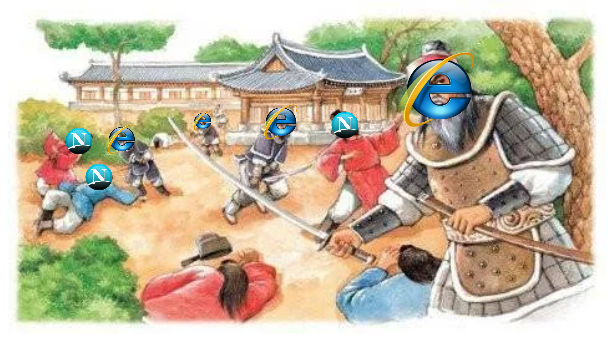
From the mid-1990s to the early 2000s, Netscape Navigator and Microsoft Internet Explorer (IE) fought intensely for browser market share. This period — known as the Browser Wars — accelerated the development of the internet and web technology.
In 1994, Netscape Communications launched Netscape Navigator and quickly dominated the browser market. Timed perfectly with the rapid spread of personal computers, it captured around 80% market share within a year.
But Microsoft, recognizing the internet’s potential, launched Internet Explorer 1.0 alongside Windows 95 in 1995. Unlike Netscape’s paid browser, IE was free — and bundled directly into Windows, installed on every PC that ran the OS. The result of pushing IE at the operating system level: by 1997, IE’s market share surged, and by the early 2000s it held over 90%.
Netscape’s Last Stand: Open Source

Realizing it could no longer win on market share, Netscape made a bold move in 1998 — it open-sourced the browser’s code. The Mozilla Foundation picked this up and launched the Mozilla Project.
That project gave us Mozilla Firefox. Development started in 2002 under the name Phoenix, went through Firebird, and culminated in Firefox 1.0 in 2004. Firefox offered a wave of innovations for its time — recently closed tab restoration, session recovery, phishing filters, native audio and video support — and built a loyal user base fast.
Then in 2008, Google Chrome delivered the decisive blow. Powered by the V8 JavaScript engine, Chrome was dramatically faster than anything else. IE became the byword for slow and bloated. Microsoft eventually pulled the plug on Internet Explorer on June 15, 2022.
Rendering Engines and JavaScript Engines
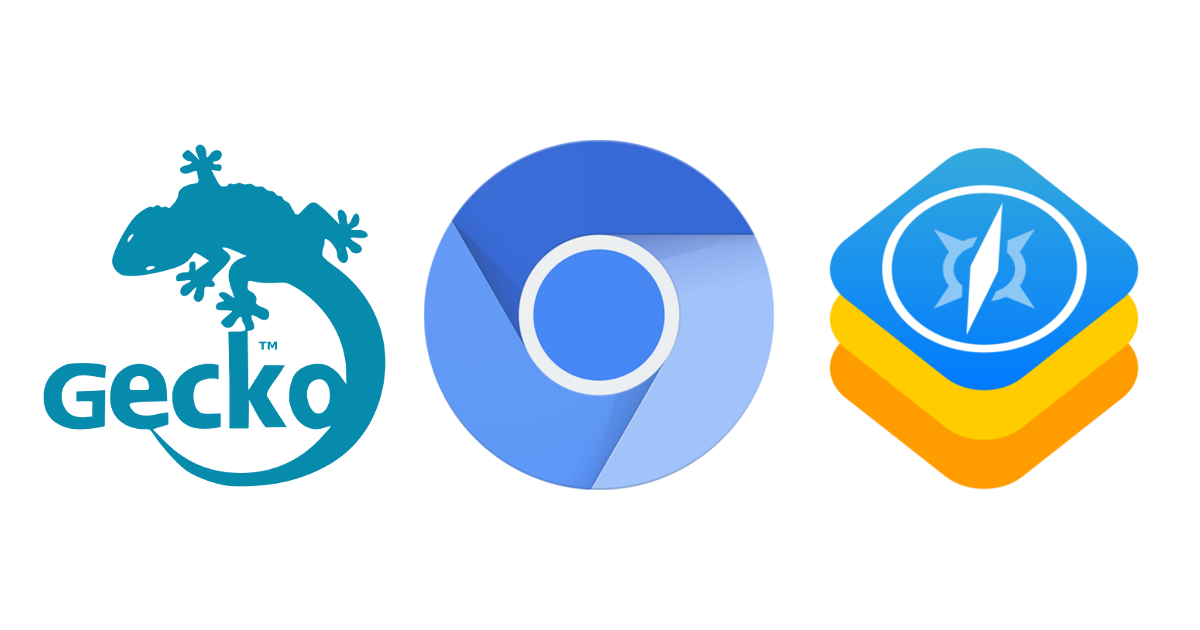
Inside every web browser is a rendering engine — the component that interprets HTML, CSS, and JavaScript and turns them into the visual experience you see. The major rendering engines and their lineage:
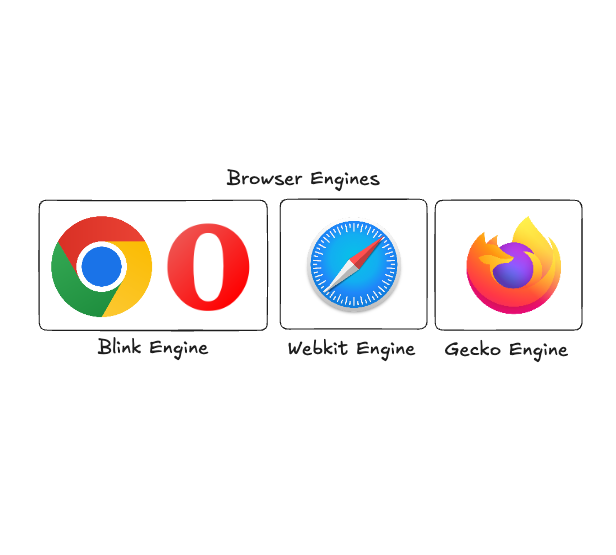
- WebKit: Developed by Apple in 2001, based on the KHTML and KJS engines. Used in Safari and all browsers on iOS. Optimized for mobile, and by Apple’s policy, all browsers on iOS must use WebKit.
- Blink: Forked from WebKit by Google in 2013. Used in Chrome, Edge, Opera, and others. Together with the V8 engine, it forms the Chromium project.
- Gecko: Originally developed by Netscape, carried on by the Mozilla Foundation as open source. Used in Firefox, known for strong web standards support and security features.
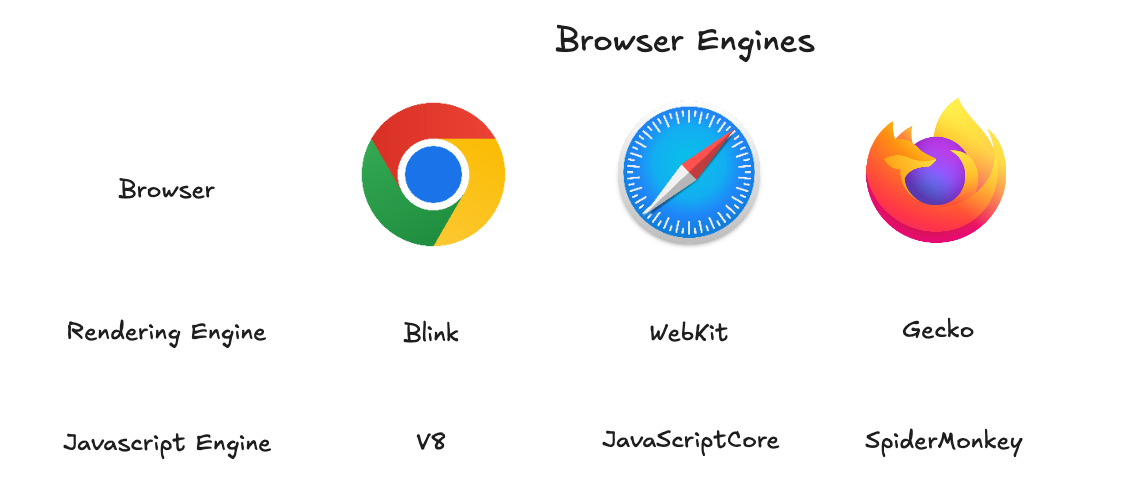
As the table shows: Chrome uses Blink + V8, Safari uses WebKit + JavaScriptCore, and Firefox uses Gecko + SpiderMonkey. When people say Chromium, they mean the combination of the Blink rendering engine and the V8 JavaScript engine.
Chrome on iOS may look like Chromium on the surface, but under the hood it uses WebKit for rendering — Apple’s policy requires it. This is exactly why frontend developers struggle with iOS: the quirks of the WebKit rendering engine.
References
- [maybe.works] The History of Web Browsers: Full Guide: https://maybe.works/blogs/browser-wars-the-history-of-browsers-and-chromium-victory
- [Node.js] Introduction to Node.js: https://nodejs.org/ko/learn/getting-started/introduction-to-nodejs
- [Evans Library] How does the V8 engine execute my code?: https://evan-moon.github.io/2019/06/28/v8-analysis/
- [JSConf] What the heck is the event loop anyway?: https://www.youtube.com/watch?v=8aGhZQkoFbQ
- [BlaCk_Log] Concurrency, parallelism, async, non-blocking and their concepts: https://black7375.tistory.com/90
- [Alexander Zlatkov] How JavaScript works: https://medium.com/sessionstack-blog/how-does-javascript-actually-work-part-1-b0bacc073cf
- [helloinyong] The exact reason Node.js is called single-threaded: https://helloinyong.tistory.com/350