Introduction
In a previous post, I covered the four core principles of GitOps and Pull-based deployments with ArgoCD. The cornerstone of GitOps is using a Git repository as the Single Source of Truth (SSOT) — but this immediately surfaces a fundamental problem: how do you handle secrets?
The UOSLIFE team runs ArgoCD pointed at a GitHub GitOps repository, with HashiCorp Vault deployed inside it via Helm chart vendoring. When we first initialized Vault, we received five unseal keys and had to enter three of them to unseal the cluster. That process prompted the question: “How does ArgoCD actually read secrets stored in Vault and make them available as real environment variables?”
The short answer is External Secrets Operator — a tool that automatically converts secrets stored in Vault into Kubernetes Secrets. This post draws on that experience to walk through the methodologies and tooling for secure secret management in a GitOps environment.
# Do NOT commit secrets to Git like this
apiVersion: v1
kind: Secret
metadata:
  name: db-credentials
type: Opaque
data:
  password: cGFzc3dvcmQxMjM=  # echo -n "password123" | base64
The moment you commit this manifest to Git, anyone can run echo "cGFzc3dvcmQxMjM=" | base64 -d and recover the original password. Kubernetes Secrets are base64-encoded, not encrypted. Even if the repository is private, Git’s distributed nature means the password lives in every local clone ever made. Once a plaintext secret is committed, it should be treated as already leaked.
1. Why Secrets Are Hard in GitOps
Recall the GitOps principles: everything is declaratively defined in Git, and an agent pulls from it to apply changes to the cluster. Since Secrets are Kubernetes resources, GitOps principles say they should live in Git too.
But security principles say the opposite: sensitive data must never be stored in plaintext in a version control system. Once a plaintext secret is committed, even reverting it via git log doesn’t help — the information remains in every distributed copy that has already been cloned.
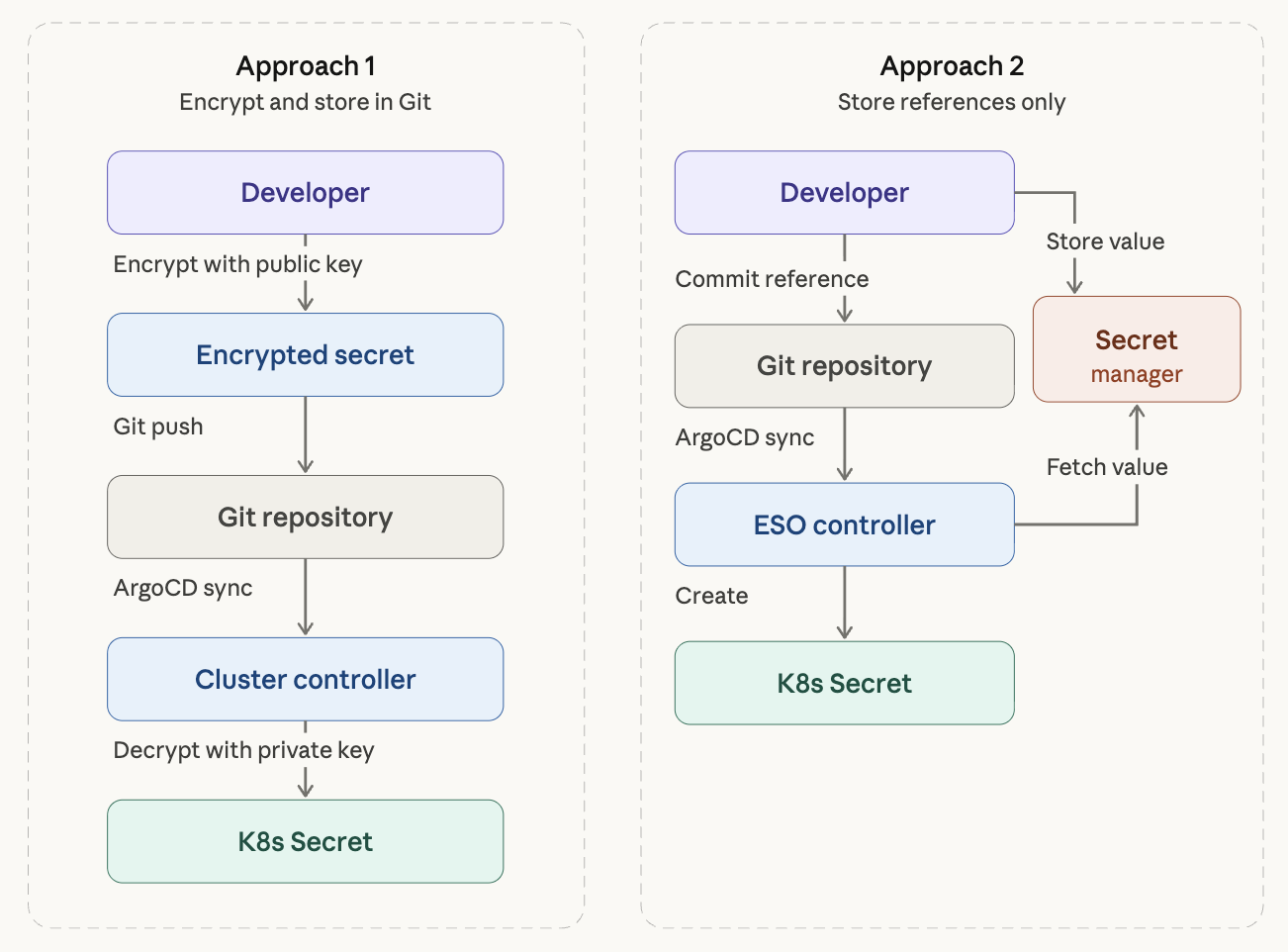
Two broad architectural approaches have emerged to resolve this tension.
Approach 1: Store Encrypted Secrets in Git
Encrypt secrets before committing them. A controller inside the cluster decrypts them and converts them into Kubernetes Secrets.
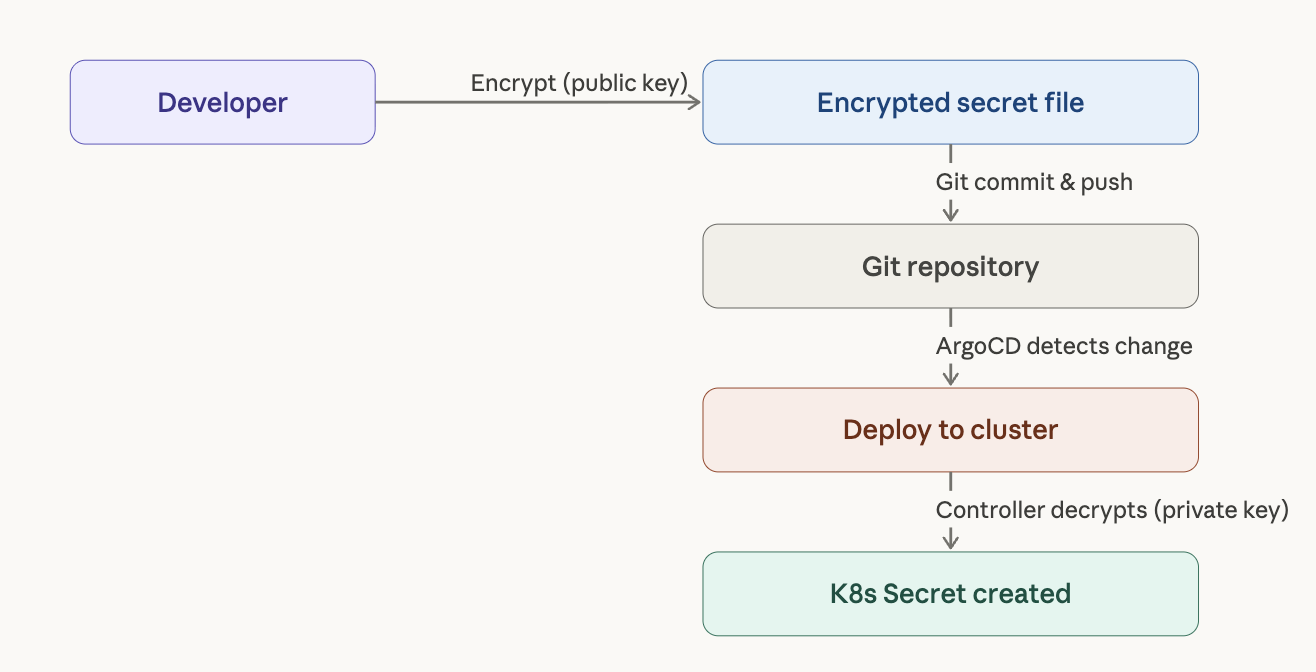
The main tools here are Bitnami Sealed Secrets and Mozilla SOPS.
Approach 2: Store Only References in Git
Keep the actual secret values in an external secret manager (HashiCorp Vault, AWS Secrets Manager, etc.) and commit only a reference to Git — essentially “fetch this key from this secret manager.”
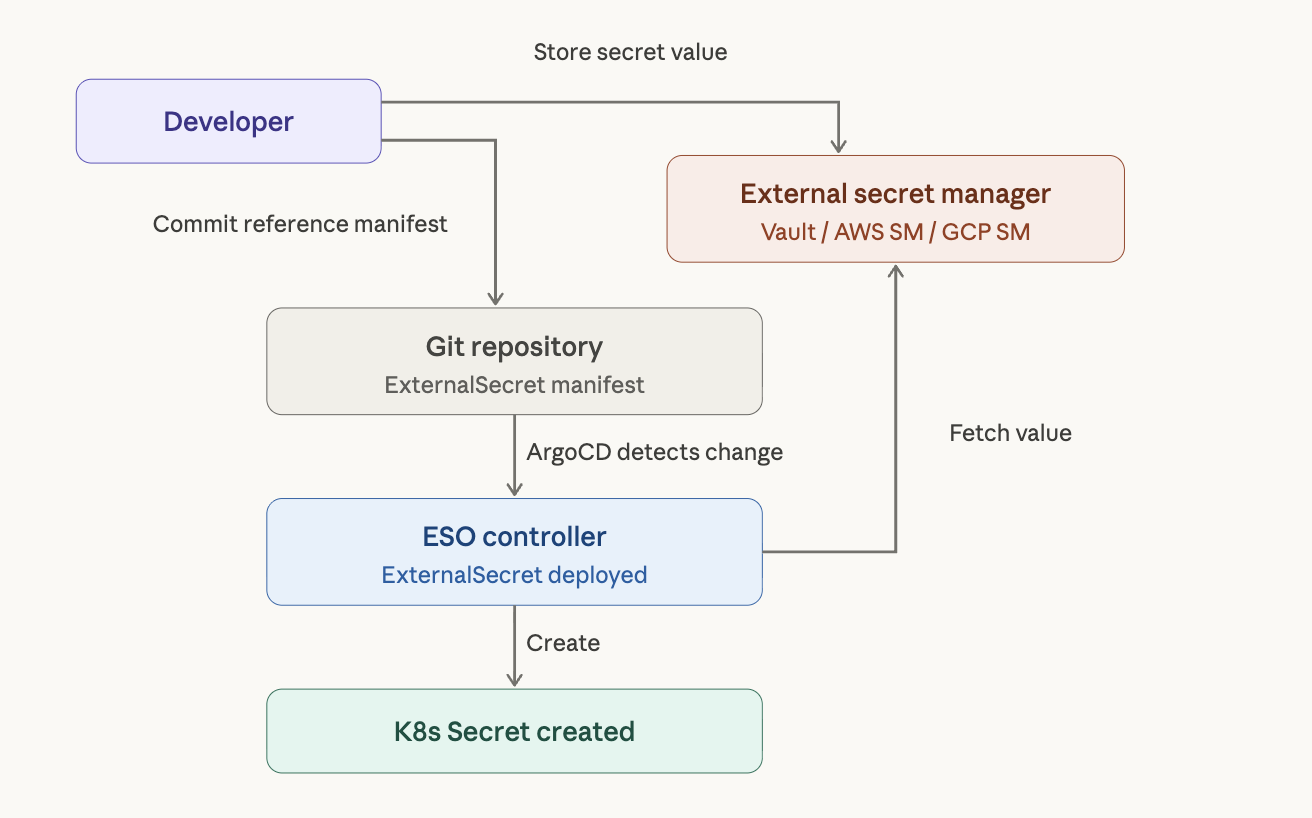
The main tools here are External Secrets Operator (ESO) and Secrets Store CSI Driver.
The ArgoCD official documentation also recommends generating secrets on the destination cluster (which covers both approaches above). Injecting secrets during the manifest generation phase poses a security risk because ArgoCD stores manifests in plaintext in its Redis cache, and it couples Secret updates with Sync operations in an undesirable way.
2. Vault Fundamentals: Understanding the Unseal Mechanism
Before diving into External Secrets Operator, it helps to understand Vault’s own security model. Vault starts in a Sealed state, in which no secrets can be read or written.
Shamir’s Secret Sharing
Vault’s unseal process is based on a cryptographic algorithm called Shamir’s Secret Sharing. At initialization (vault operator init), the master key is split into N key shares, and T of them (the threshold) must be combined to reconstruct it.
# Initialize Vault — 5 key shares, threshold of 3
vault operator init -key-shares=5 -key-threshold=3
With key-shares=5, key-threshold=3, any three of the five keys must be entered to unseal Vault. The intent is to distribute key shares across different people so that no single person holds the entire master key, eliminating a single point of compromise.
Development vs. Production
In practice, when first setting up Vault, one person typically receives all five keys and enters three of them directly. This is fine for development, but using this approach in production defeats the purpose of Shamir’s Secret Sharing.
Production deployments generally use one of two approaches.
Key distribution: At initialization, distribute each key share to a different team member. Five keys go to five people; on restart, three of them each enter their key. For small teams, though, gathering three people every time a Pod restarts is operationally impractical.
Auto Unseal: Delegate master key encryption to an external KMS such as AWS KMS or GCP Cloud KMS. Vault then unseals automatically on Pod restart. This is effectively the industry standard.
# Vault Helm values.yaml — AWS KMS Auto Unseal configuration
server:
  ha:
    enabled: true
    config: |
      seal "awskms" {
        region     = "ap-northeast-2"
        kms_key_id = "arn:aws:kms:ap-northeast-2:123456:key/abcd-1234"
      }
With Auto Unseal, Shamir key shares become unnecessary and the security boundary shifts to the KMS IAM policy. Even on an on-prem k3s cluster, this works as long as the cluster can reach the AWS API — through IAM Roles Anywhere, for example.
One more thing: the Root Token received at initialization should be revoked with
vault token revokeonce initial policy configuration is complete. From that point on, use only identity-based authentication such as Kubernetes Auth.
3. Bitnami Sealed Secrets
Sealed Secrets is the most approachable secret management tool for GitOps. It uses public key cryptography to safely store secrets in Git without requiring any external secret manager.
How It Works
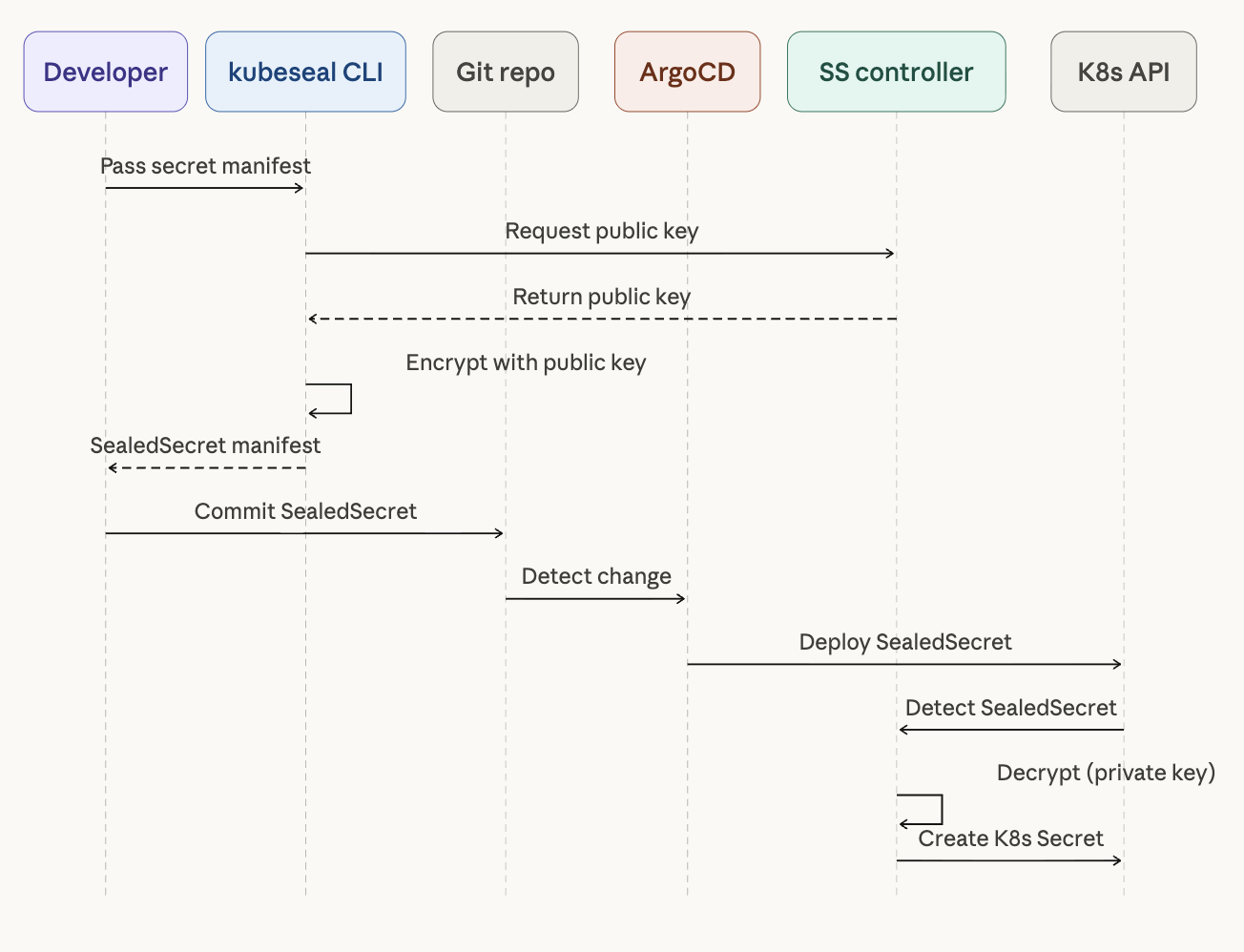
Sealed Secrets uses asymmetric encryption (AES-256-GCM). The SealedSecrets controller installed in the cluster generates a key pair, and developers use the kubeseal CLI to encrypt secrets with the public key. Only the controller inside the cluster can decrypt them.
Installation and Usage
# Install the SealedSecrets controller
helm repo add sealed-secrets https://bitnami-labs.github.io/sealed-secrets
helm install sealed-secrets sealed-secrets/sealed-secrets \
  --namespace kube-system

# Install kubeseal CLI (macOS)
brew install kubeseal
Create a standard Kubernetes Secret manifest, then encrypt it with kubeseal.
# 1. Write a plain Secret manifest
cat <<EOF > secret.yaml
apiVersion: v1
kind: Secret
metadata:
  name: db-credentials
  namespace: default
type: Opaque
stringData:
  username: admin
  password: super-secret-password
EOF

# 2. Encrypt with kubeseal
kubeseal --format yaml < secret.yaml > sealed-secret.yaml

# 3. Delete the original, commit only the encrypted file
rm secret.yaml
git add sealed-secret.yaml
git commit -m "feat: add encrypted db credentials"
The resulting SealedSecret manifest looks like this:
apiVersion: bitnami.com/v1alpha1
kind: SealedSecret
metadata:
  name: db-credentials
  namespace: default
spec:
  encryptedData:
    username: AgBy3i4OJSWK+PiTySYZZA9rO43...  # encrypted value
    password: AgCtr8bMOav3wHNEQ14FVg7B2K2...  # encrypted value
  template:
    metadata:
      name: db-credentials
      namespace: default
    type: Opaque
This file is safe to store in Git. When deployed to the cluster, the SealedSecrets controller automatically decrypts it and creates a standard Kubernetes Secret.
Pros and Cons
The main advantage of Sealed Secrets is no external dependencies. There is no need for a separate infrastructure component like Vault — install the controller and you’re ready to go. It integrates naturally with GitOps workflows.
The main limitation is that it is cluster-scoped. Each cluster generates its own unique key pair, so deploying the same secret to multiple clusters requires re-encrypting it per cluster. Management overhead grows quickly in multi-cluster environments. Secret rotation also requires manual re-encryption, making it unsuitable for runtime secret management.
4. Mozilla SOPS (Secrets OPerationS)
SOPS is a general-purpose encryption/decryption tool that is not limited to Kubernetes. It supports YAML, JSON, ENV, INI, and binary formats, and integrates with multiple key management backends including AWS KMS, GCP KMS, Azure Key Vault, age, and PGP.
Key Difference from Sealed Secrets
Sealed Secrets encrypts an entire file, whereas SOPS selectively encrypts only values. The structure of the encrypted file remains readable, which makes code reviews and git diff output much easier to follow.
Another important difference is where encryption and decryption occur. Sealed Secrets handles this server-side (in the cluster), while SOPS handles it client-side. This means the CI/CD pipeline needs access to decryption keys.
# SOPS-encrypted file — keys are readable, only values are encrypted
apiVersion: v1
kind: Secret
metadata:
  name: db-credentials
type: Opaque
stringData:
  username: ENC[AES256_GCM,data:7WgPOw==,iv:...,tag:...,type:str]
  password: ENC[AES256_GCM,data:K8vXzR5u...,iv:...,tag:...,type:str]
sops:
  kms:
    - arn: arn:aws:kms:ap-northeast-2:123456789012:key/xxxx-xxxx
  lastmodified: "2026-03-26T12:00:00Z"
  version: 3.9.0
Installation and Usage
# Install SOPS (macOS)
brew install sops

# Generate an age key (a modern alternative to PGP)
age-keygen -o age.key
A .sops.yaml configuration file lets you control exactly what gets encrypted.
# .sops.yaml
creation_rules:
  - path_regex: \.yaml$
    encrypted_regex: "^(data|stringData)$"
    age: age1ql3z7hjy54pw3hyww5ayyfg7zqgvc7w3j2elw8zmrj2kg5sfn9aqmcac8p
# Encrypt
sops -e secret.yaml > secret.enc.yaml

# In-place edit (decrypts → edit → auto re-encrypts on save)
sops secret.enc.yaml
ArgoCD Integration Considerations
To use SOPS with ArgoCD, you need KSOPS (a Kustomize SOPS plugin). This requires either building a custom ArgoCD image or configuring a Kustomize plugin — additional setup that should be factored into your decision. Flux natively supports SOPS without extra plugins, but in an ArgoCD environment that setup cost is real.
Pros and Cons
SOPS shines in versatility. It can encrypt any configuration file — not just Kubernetes Secrets, but also Helm values.yaml, Terraform .tfvars, and more. Selective value encryption means git diff still shows structural changes, which is a significant workflow advantage. Cloud KMS integration reduces key management burden.
The downsides are the additional setup required for ArgoCD integration, and the fact that key distribution and management become complex as teams and clusters grow.
5. External Secrets Operator (ESO)
ESO is currently the most recommended approach to secret management in GitOps environments. The UOSLIFE team uses it in an ArgoCD + Vault setup. Actual secret values live in an external secret manager; Git contains only the reference — “fetch this from here.”
Why ESO?
You cannot put plaintext secrets in a GitOps repository, but ArgoCD syncs whatever manifests are in Git directly to the cluster — it has no native way to say “go fetch this from Vault.” ESO bridges exactly that gap.
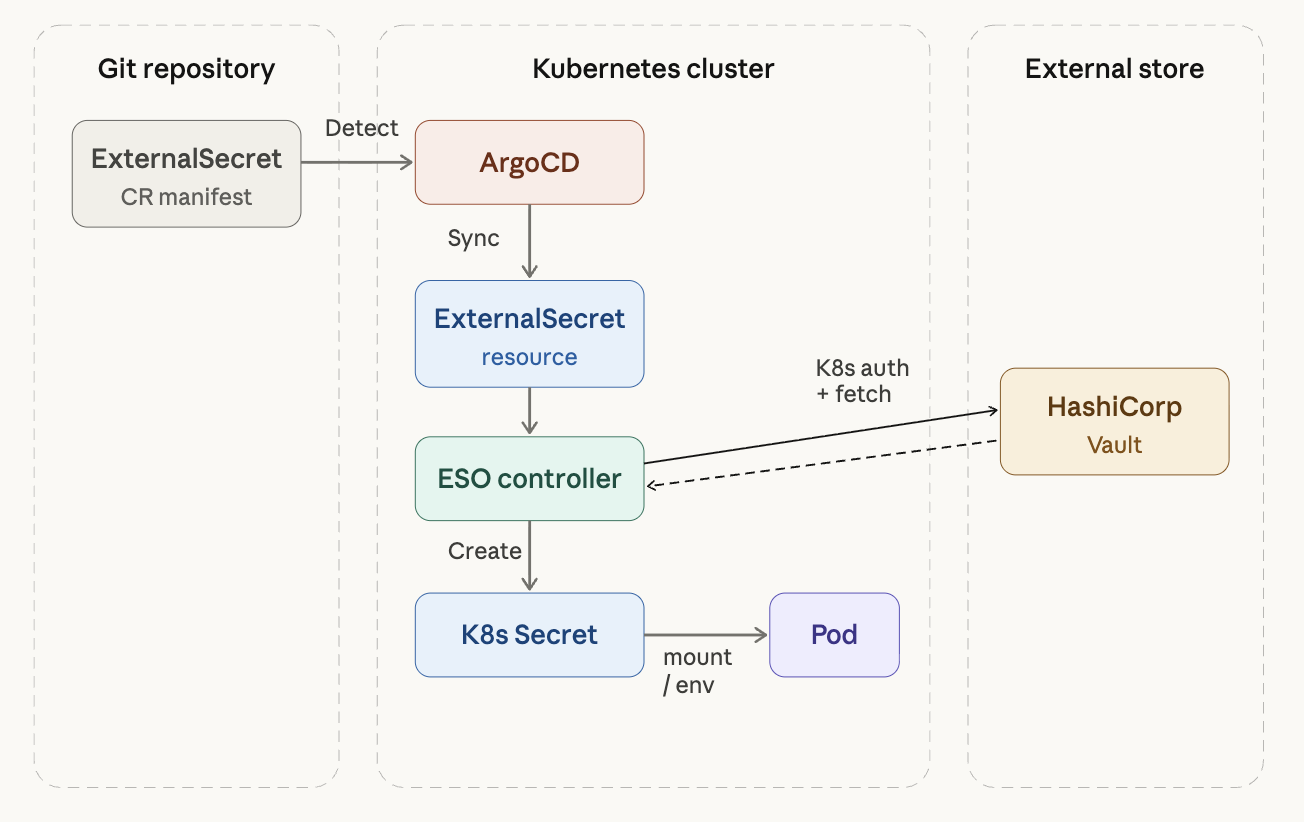
The full chain looks like this:
Git(ExternalSecret CR) → ArgoCD sync → ESO Controller detects it
  → fetches from Vault → creates K8s Secret → Pod uses Secret via mount/env
Core Custom Resources
ESO provides several CRDs, each with a distinct role.
1) SecretStore vs ClusterSecretStore
Both define “how to connect to the external secret manager,” differing only in scope.
A SecretStore is namespace-scoped. Only ExternalSecrets in the same namespace can reference it — useful when teams share a cluster with strict access boundaries per namespace.
A ClusterSecretStore is cluster-wide. Any ExternalSecret in any namespace can reference it — convenient when a small team shares a single Vault instance.
apiVersion: external-secrets.io/v1beta1
kind: ClusterSecretStore
metadata:
  name: vault-backend
spec:
  provider:
    vault:
      server: "http://vault.vault.svc.cluster.local:8200"
      path: "secret"          # KV secret engine mount path
      version: "v2"           # for KV v2
      auth:
        kubernetes:
          mountPath: "kubernetes"
          role: "eso-role"     # pre-created role in Vault
          serviceAccountRef:
            name: "external-secrets"
            namespace: "external-secrets"
The key piece is the auth block. Using Vault’s Kubernetes Auth Method, ESO authenticates with its ServiceAccount token — no separate token needs to go in Git. Access scope is controlled by which policies are attached to this role in Vault.
2) ExternalSecret
This CR declares “what to fetch.” It is the resource you will work with most often.
apiVersion: external-secrets.io/v1beta1
kind: ExternalSecret
metadata:
  name: my-app-secrets
  namespace: production
spec:
  refreshInterval: 1h          # periodically re-fetch from Vault
  secretStoreRef:
    name: vault-backend
    kind: ClusterSecretStore
  target:
    name: my-app-secrets       # name of the resulting K8s Secret
    creationPolicy: Owner      # delete Secret when ExternalSecret is deleted
  data:
    - secretKey: DB_PASSWORD
      remoteRef:
        key: secret/data/production/my-app
        property: db_password
    - secretKey: API_KEY
      remoteRef:
        key: secret/data/production/my-app
        property: api_key
This manifest contains no actual secret values. It is purely a reference: “create a K8s Secret named my-app-secrets by fetching db_password and api_key from Vault at secret/data/production/my-app.”
Using dataFrom, you can pull all keys from a path at once:
spec:
  dataFrom:
    - extract:
        key: secret/data/production/my-app
  # All key-value pairs at that Vault path become K8s Secret data entries
This avoids mapping keys one by one when there are many of them.
3) ClusterExternalSecret
The cluster-wide version of ExternalSecret. Use this when you need to deploy the same Secret to multiple namespaces — wildcard TLS certificates or shared image pull secrets are typical use cases.
apiVersion: external-secrets.io/v1beta1
kind: ClusterExternalSecret
metadata:
  name: shared-tls-cert
spec:
  namespaceSelector:
    matchLabels:
      needs-tls: "true"       # deploy to all namespaces with this label
  externalSecretSpec:
    refreshInterval: 24h
    secretStoreRef:
      name: vault-backend
      kind: ClusterSecretStore
    target:
      name: wildcard-tls
    data:
      - secretKey: tls.crt
        remoteRef:
          key: secret/data/shared/tls
          property: certificate
      - secretKey: tls.key
        remoteRef:
          key: secret/data/shared/tls
          property: private_key
4) PushSecret (reverse direction)
The inverse: push a K8s Secret into Vault. This is useful for things like backing up certificates auto-issued by cert-manager into Vault. Not commonly needed, but worth knowing.
Vault Kubernetes Auth Setup (Prerequisite)
For ESO to access Vault, you must enable Kubernetes Auth in Vault and configure the appropriate role and policy. This is the foundational prerequisite for the entire chain.
# 1. Enable Kubernetes Auth in Vault
vault auth enable kubernetes

# 2. Register the K8s API server
vault write auth/kubernetes/config \
  kubernetes_host="https://kubernetes.default.svc"

# 3. Create the role ESO will use
vault write auth/kubernetes/role/eso-role \
  bound_service_account_names=external-secrets \
  bound_service_account_namespaces=external-secrets \
  policies=my-app-read \
  ttl=1h

# 4. Create a read-only policy
vault policy write my-app-read - <<EOF
path "secret/data/*" {
  capabilities = ["read"]
}
EOF
This configuration is what connects the ESO → Vault authentication chain.
6. Multi-Provider: Vault + AWS Secrets Manager in Parallel
One of ESO’s best design decisions is its provider abstraction. Because SecretStore defines “where to fetch from” and ExternalSecret defines “what to fetch,” swapping the backend from Vault to AWS Secrets Manager only changes the remoteRef.key format — everything else stays the same.
ClusterSecretStore for AWS Secrets Manager
apiVersion: external-secrets.io/v1beta1
kind: ClusterSecretStore
metadata:
  name: aws-secrets-manager
spec:
  provider:
    aws:
      service: SecretsManager
      region: ap-northeast-2
      auth:
        jwt:
          serviceAccountRef:
            name: external-secrets
            namespace: external-secrets
The only change from the Vault example is spec.provider.vault becoming spec.provider.aws. On EKS, IRSA (IAM Roles for Service Accounts) handles authentication cleanly. On an on-prem k3s cluster, you can use IAM Roles Anywhere or reference an accessKeyID/secretAccessKey directly.
What Changes in ExternalSecret
On the ExternalSecret side, only secretStoreRef.name and the remoteRef.key format change.
apiVersion: external-secrets.io/v1beta1
kind: ExternalSecret
metadata:
  name: my-app-secrets
  namespace: production
spec:
  refreshInterval: 1h
  secretStoreRef:
    name: aws-secrets-manager      # only the provider changes
    kind: ClusterSecretStore
  target:
    name: my-app-secrets
  data:
    - secretKey: DB_PASSWORD
      remoteRef:
        key: production/my-app     # AWS SM secret name
        property: db_password      # field within the JSON
Hybrid Configuration
Creating multiple ClusterSecretStores lets you use Vault and AWS Secrets Manager simultaneously. Each ExternalSecret simply specifies which store to use via secretStoreRef.name.
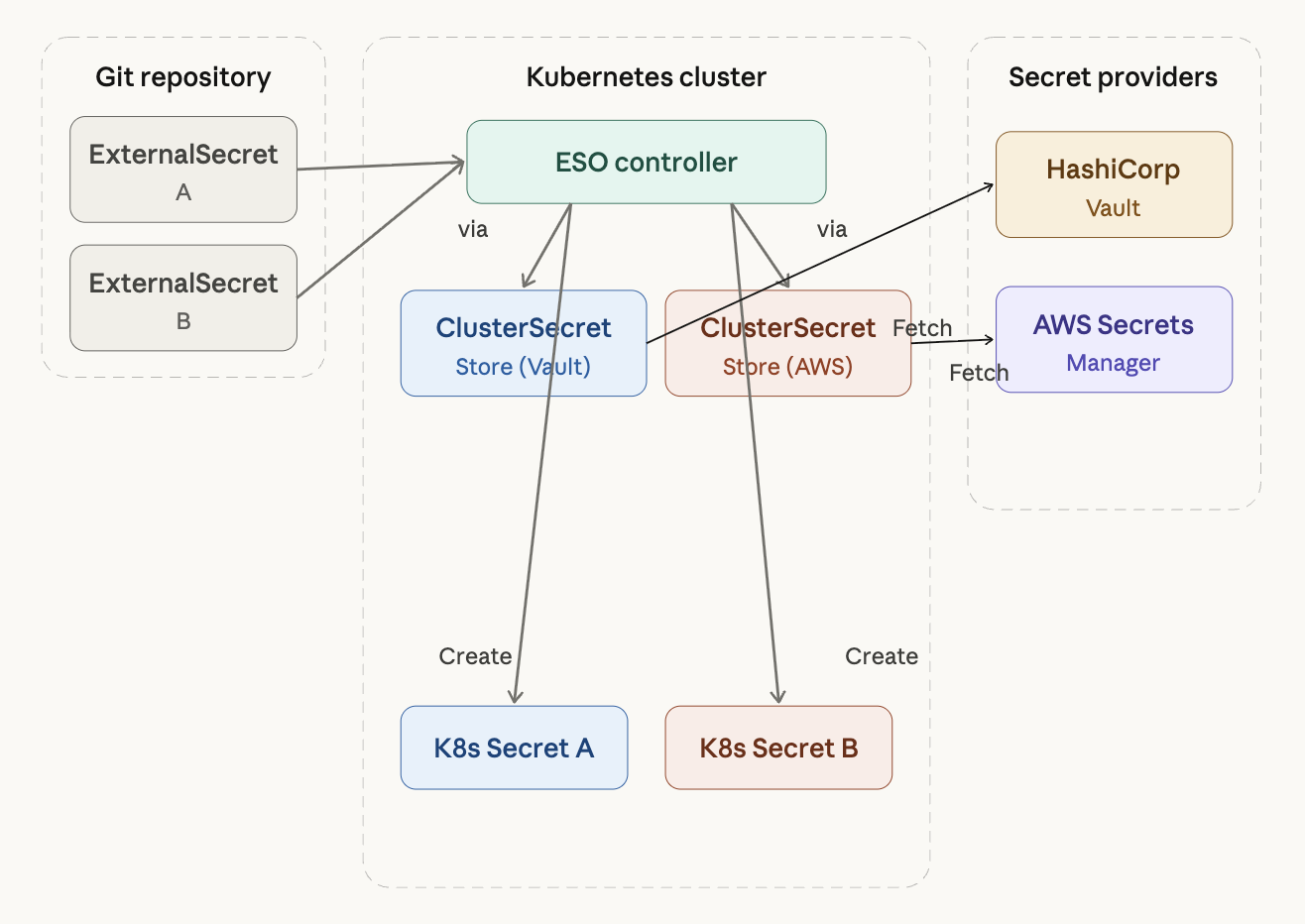
A practical hybrid pattern is to use Vault as the primary provider while pulling AWS resource secrets (like RDS passwords) directly from AWS Secrets Manager. ESO also supports GCP Secret Manager, Azure Key Vault, 1Password, Doppler, and more — all follow the same structure, with only the spec.provider block differing.
7. Secrets Store CSI Driver
The Secrets Store CSI Driver takes a fundamentally different approach from the tools covered so far. Instead of creating a Kubernetes Secret, it mounts secrets directly into a Pod as a volume. This is the option for environments where compliance requirements prohibit storing secrets in etcd at all.
apiVersion: secrets-store.csi.x-k8s.io/v1
kind: SecretProviderClass
metadata:
  name: vault-db-creds
spec:
  provider: vault
  parameters:
    vaultAddress: "https://vault.example.com"
    roleName: "my-app"
    objects: |
      - objectName: "db-password"
        secretPath: "secret/data/db-credentials"
        secretKey: "password"
When a Pod is scheduled, the CSI Driver fetches the secret from the external manager and mounts it as a file. Because this is a volume mount by default, injecting secrets as environment variables or using them as image pull secrets requires additional sync configuration. The driver runs as a DaemonSet, which means it consumes resources on every node.
In practice, the common pattern is to manage most secrets with ESO and use the CSI Driver only where specific compliance requirements demand it.
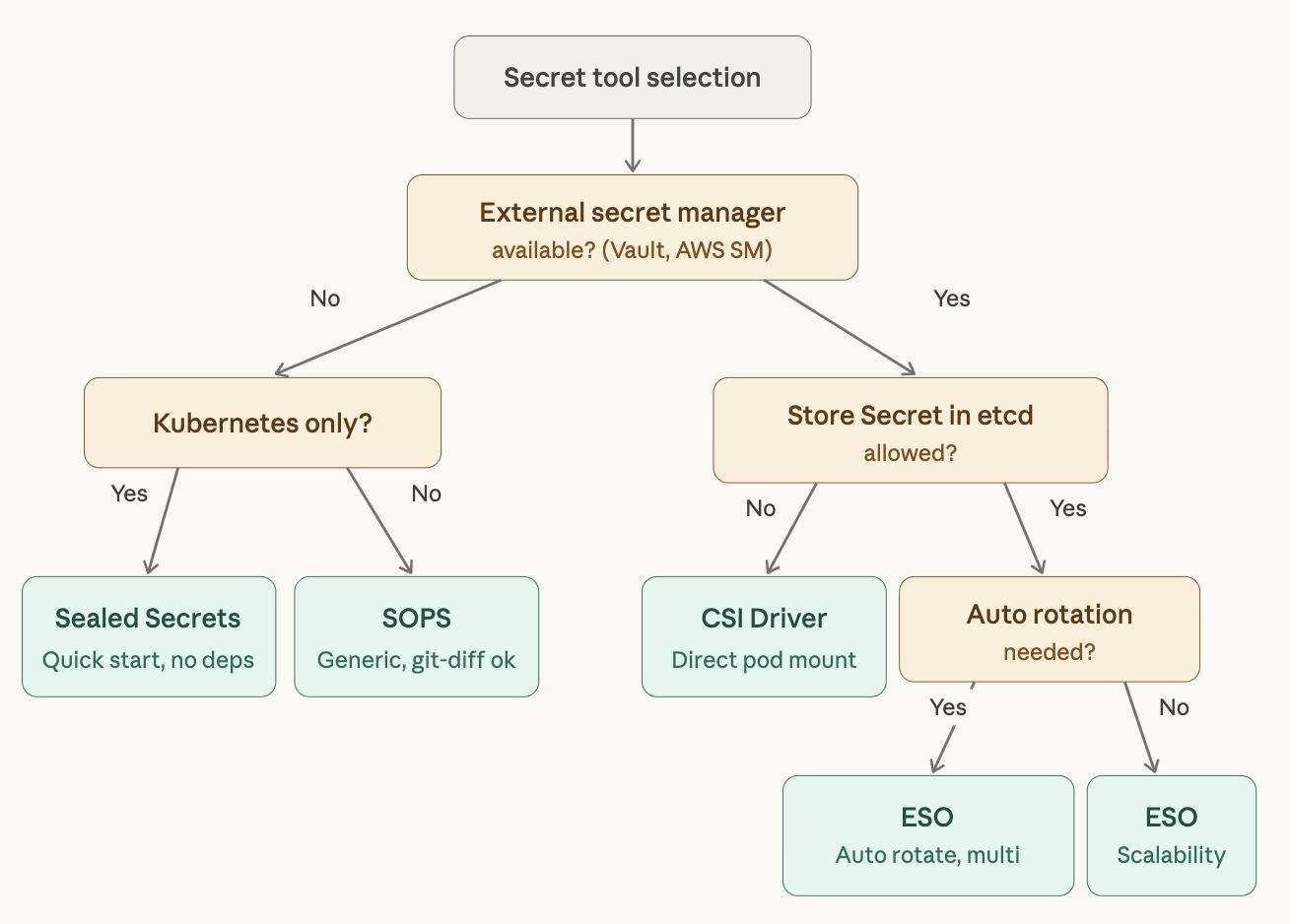
8. Tool Comparison and Selection Guide
| Sealed Secrets | SOPS | ESO | CSI Driver | |
|---|---|---|---|---|
| Approach | Encrypted in Git | Encrypted in Git | External manager reference | External manager reference |
| External dependency | None | KMS (optional) | Required | Required |
| Encryption granularity | Entire file | Values only | N/A | N/A |
| Secret rotation | Manual re-encryption | Manual re-encryption | Automatic (refreshInterval) | Automatic |
| Multi-cluster | Per-cluster re-encryption | Shareable via KMS | Same manager reference | Same manager reference |
| ArgoCD integration | Natural | Requires KSOPS | Natural | Natural |
| Flux integration | Natural | Native support | Natural | Natural |
| Initial setup cost | Low | Low | Medium–High | Medium–High |
| Scalability | Low | Medium | High | High |
| Multi-provider | No | Per KMS | Supported | Supported |
Recommendations by Situation
Small team, single cluster, want to start quickly → Sealed Secrets. No external infrastructure needed, low learning curve.
GitOps + IaC integration, need to encrypt Helm values → SOPS. Its versatility beyond Kubernetes is the key advantage. Factor in the KSOPS setup overhead if you are on ArgoCD.
Production environment, multi-cluster, need automatic rotation → External Secrets Operator. The upfront cost is higher, but long-term operational burden is the lowest. ArgoCD’s official documentation recommends this approach.
Compliance requirements prohibit storing secrets in etcd → CSI Driver, or run it alongside ESO.
9. Production Architecture: ESO + Vault + ArgoCD
Here is the most common production setup. The UOSLIFE team runs a structure similar to this.
GitOps Repository Structure
gitops/
├── vault/                        # Vault Helm chart vendoring
│   ├── Chart.yaml
│   ├── charts/
│   └── values.yaml
├── external-secrets/             # ESO Helm chart vendoring
│   ├── Chart.yaml
│   ├── charts/
│   └── values.yaml
├── cluster-secret-stores/
│   └── vault-backend.yaml        # ClusterSecretStore
└── apps/
    └── my-app/
        ├── base/
        │   ├── deployment.yaml
        │   ├── service.yaml
        │   └── externalsecret.yaml   # Secret reference manifest
        └── overlays/
            ├── dev/
            │   └── externalsecret-patch.yaml  # Vault path pointing to dev
            └── prod/
                └── externalsecret-patch.yaml  # Vault path pointing to prod
Both Vault and ESO are managed in the GitOps repo using Helm chart vendoring. Environment-specific separation is handled in Kustomize overlays by changing only the remoteRef.key path in the ExternalSecret — secret/data/dev/my-app becomes secret/data/prod/my-app. Same structure, different path.
ArgoCD Application Deployment Order
When using this structure with ArgoCD, deployment order matters. ESO’s CRDs must be installed before any ExternalSecret can be deployed.
Step 1: Install ESO (including CRDs)
Step 2: Deploy ClusterSecretStore
Step 3: Deploy apps containing ExternalSecrets
ArgoCD sync waves control this ordering — the same pattern used when deploying Sentry or other CRD-dependent applications.
# ESO Application gets sync wave -2
metadata:
  annotations:
    argocd.argoproj.io/sync-wave: "-2"

# ClusterSecretStore gets sync wave -1
metadata:
  annotations:
    argocd.argoproj.io/sync-wave: "-1"

# All other apps deploy at the default (0)
End-to-End Deployment Flow
- A developer stores a secret value at
secret/data/production/my-appvia the Vault UI or CLI. - The ExternalSecret manifest is committed to the GitOps repository.
- ArgoCD detects the change and syncs the ExternalSecret to the cluster.
- The ESO Controller authenticates via Vault Kubernetes Auth and retrieves the secret value.
- ESO creates the Kubernetes Secret
my-app-secrets. - The Deployment references that Secret via
envFrom.
When a secret value changes in Vault, ESO automatically updates the Kubernetes Secret according to its refreshInterval. If the application needs to restart to pick up the new value, Stakater Reloader can be used alongside ESO to trigger an automatic rolling restart whenever the Secret changes.
apiVersion: apps/v1
kind: Deployment
metadata:
  name: api-server
  annotations:
    reloader.stakater.com/auto: "true"  # auto-restart on Secret change
spec:
  template:
    spec:
      containers:
        - name: api-server
          envFrom:
            - secretRef:
                name: my-app-secrets
10. Best Practices
Here are the principles that apply across all GitOps secret management approaches.
In the Git Repository
Never commit plaintext secrets. Use a tool like detect-secrets in a pre-commit hook or CI pipeline to automatically block plaintext secret commits.
# .pre-commit-config.yaml example
repos:
  - repo: https://github.com/Yelp/detect-secrets
    rev: v1.4.0
    hooks:
      - id: detect-secrets
        args: ['--baseline', '.secrets.baseline']
Keep secret-related manifests in a separate directory. This makes it easier to apply stricter RBAC and code review policies to those files.
In Operations
Establish a secret rotation policy. If using an external secret manager, configure automatic rotation. If using an encryption-based approach, schedule regular re-encryption.
Apply the principle of least privilege. In Vault’s Kubernetes Auth, separate policies per role so each application can only access its own secrets.
# Policy granting my-app read access to its own path only
vault policy write my-app-read - <<EOF
path "secret/data/production/my-app" {
  capabilities = ["read"]
}
EOF
Revoke the Vault Root Token after initial setup. Use only identity-based authentication such as Kubernetes Auth from that point forward.
ArgoCD-Specific Practices
The ArgoCD official documentation recommends managing secrets on the destination cluster for three reasons.
First, ArgoCD does not need direct access to secret values, reducing security exposure. ArgoCD stores manifests in plaintext in Redis; injecting secrets during manifest generation means plaintext secrets end up in that cache.
Second, secret updates are decoupled from app syncs. With an Operator-based approach like ESO, secrets update independently, eliminating the risk of unintentionally changing secrets during an unrelated deployment.
Third, it is compatible with the Rendered Manifests pattern. This pattern is becoming mainstream in GitOps and is incompatible with secret injection at the manifest generation stage.
Closing
Secret management in GitOps is fundamentally about finding the right balance between “everything lives in Git” and “sensitive data must be protected.” The core GitOps principles covered in the previous post — declarative definition, version control, Pull-based deployment, and continuous reconciliation — can all be preserved while handling secrets securely, provided you choose the right tools and follow sound operational practices.
To summarize:
For small-scale, fast-start use cases, go with Sealed Secrets. For production environments that need scalability and automation, use External Secrets Operator + Vault (or AWS Secrets Manager). If you are running ArgoCD, adopting the Operator-based, destination-cluster secret management approach that the official documentation recommends is the safest and most maintainable choice in the long run.
Thanks to ESO’s provider abstraction, starting with Vault does not lock you in — migrating to AWS Secrets Manager, GCP Secret Manager, or a hybrid configuration remains straightforward. That flexibility is, ultimately, the strongest reason to choose ESO.