Introduction
I tend to attend every infrastructure-related seminar I can, and if I had to pick the one topic that serves as the foundation for all of them, it would be GitOps. In fact, our team at UOSLIFE manages infrastructure through GitOps — we have dedicated repositories that define both our AWS infrastructure and the manifests that ArgoCD watches.
When people hear GitOps, they often think only of Kubernetes clusters, but it applies equally well to AWS through tools like Terraform, Pulumi, or AWS CDK. This means both major pillars of infrastructure — cluster management and cloud resource management — can be implemented through GitOps. Most companies manage these two areas separately as well.
Personally, I think GitOps is one of the most popular keywords in the field right now. The only keyword that might be more cutting-edge in the DevOps space is platform engineering. Building on top of GitOps, some companies have gone further by building their own tools similar to Terraform or ArgoCD, creating safer and more convenient platforms through platform engineering.
What is GitOps?
The definition of GitOps is quite simple. It’s an operational model that uses a Git repository as the Single Source of Truth (SSOT) for infrastructure and applications. In essence, it’s managing infrastructure through Git — a tool that every developer is already familiar with.
Treating a Git repository as the SSOT carries a tremendous amount of meaning. The CNCF’s OpenGitOps project defines four official principles.
The Four Core Principles
- Declarative: The desired state of the system is described declaratively. Kubernetes manifests, Kustomize overlays, and Helm charts all fall into this category. It’s about defining what, not how.
- Versioned and Immutable: Since all state is stored in Git, you naturally get version control, audit trails, and rollback capabilities. You can trace who changed what, when, and why through Git history, which is also advantageous for security audits.
- Pulled Automatically: Once approved changes are merged into Git, an agent automatically detects and applies them to the cluster. ArgoCD and Flux serve this role.
- Continuously Reconciled: The agent continuously compares the live state with the desired state, and automatically corrects any drift. Even if someone makes a direct change via kubectl edit or the AWS Console, ArgoCD or automated IaC will revert it back to the declared state.
These are the four core principles. While many blog posts about GitOps cite these same principles, let me elaborate on each one in detail below.
The Declarative Paradigm
The first foundational concept of GitOps is that it is declarative. To understand what declarative means, it helps to compare it with its opposite — imperative.
The declarative approach, much like creating resources such as S3 buckets with Terraform or Kubernetes clusters, involves simply declaring what resources should exist without concerning yourself with how they’re created. The implementation details are the responsibility of the Terraform Provider or the Kubernetes cluster. To illustrate this concretely, here are some real scripts.
A declarative script creating an S3 bucket with Terraform:
resource "aws_s3_bucket" "app_assets" {
  bucket = "my-app-assets"

  tags = {
    Team = "backend"
  }
}

resource "aws_s3_bucket_versioning" "app_assets" {
  bucket = aws_s3_bucket.app_assets.id
  versioning_configuration {
    status = "Enabled"
  }
}
A declarative Kubernetes manifest for an nginx Deployment:
apiVersion: apps/v1
kind: Deployment
metadata:
  name: nginx
spec:
  replicas: 3
  selector:
    matchLabels:
      app: nginx
  template:
    metadata:
      labels:
        app: nginx
    spec:
      containers:
        - name: nginx
          image: nginx:1.27
          ports:
            - containerPort: 80
Both examples only describe the desired state — “spin up 3 nginx pods” or “create an S3 bucket” — while the actual creation process is handled by the Terraform Provider and the Kubernetes controller.
In contrast, performing the same tasks imperatively via CLI looks like this.
An imperative script creating an S3 bucket with AWS CLI:
aws s3api create-bucket \
  --bucket my-app-assets \
  --region ap-northeast-2 \
  --create-bucket-configuration LocationConstraint=ap-northeast-2
aws s3api put-bucket-versioning \
  --bucket my-app-assets \
  --versioning-configuration Status=Enabled
aws s3api put-bucket-tagging \
  --bucket my-app-assets \
  --tagging 'TagSet=[{Key=Team,Value=backend}]'
An imperative script creating an nginx Deployment with kubectl:
kubectl create deployment nginx --image=nginx:1.27 --replicas=3
kubectl expose deployment nginx --port=80 --target-port=80
At first glance, the imperative approach might seem more concise, but it has critical drawbacks in real-world operations.
- No idempotency: Running the same script twice results in an “already exists” error. The declarative approach compares the current state with the desired state and only applies the differences, guaranteeing the same result no matter how many times you run it.
- No state tracking: Scripts only record the actions performed at the moment of execution — they can’t tell you what state the infrastructure is currently in. If someone changes a setting directly through the console, the script and actual state immediately diverge.
- Difficult change history management: Even if you put shell scripts in Git, you can only see “what commands were executed,” not “what state the infrastructure should be in.”
- Complex rollbacks: To revert to a previous state, you need to write a separate reverse script. With the declarative approach, a simple
git revertto a previous commit lets the agent automatically restore the previous state.
The difference between implementing resources declaratively versus imperatively is significant. This is why many CNCF projects and conferences advocate for declarative infrastructure management based on GitOps.
Versioning and Immutability
The versioning and immutability aspect essentially borrows Git’s own concepts directly. You can see exactly what changed and how through git diff, and you can identify who made each change and with what commit message.
Rollbacks also don’t require carefully and methodically undoing previous S3 creation steps in order — you can simply resolve it with git revert.
For example, to track who accessed and modified which resources in AWS, you’d need to use CloudTrail. CloudTrail event logs are recorded in JSON format like this:
{
  "eventTime": "2026-03-15T09:23:17Z",
  "eventName": "PutBucketVersioning",
  "userIdentity": {
    "type": "IAMUser",
    "userName": "deploy-bot"
  },
  "requestParameters": {
    "bucketName": "my-app-assets",
    "VersioningConfiguration": {
      "Status": "Enabled"
    }
  }
}
You can see “who called which API and when,” but you can’t see why the change was made. To compare the state before and after a change, you need to set up additional services like AWS Config, and sifting through JSON logs is far from readable.
In a GitOps-based approach, Git itself becomes the audit log. Just looking at the commit history gives you a clear picture of infrastructure change history.
$ git log --oneline
a1b2c3d feat: increase nginx replicas to 5 for traffic spike
e4f5g6h fix: rollback S3 bucket policy to restrict public access
i7j8k9l feat: add redis cluster for session caching
You can instantly compare before-and-after states with git diff and track who changed a specific line and when with git blame. Furthermore, since GitHub PRs include descriptions and review comments explaining “why” a change was made, you capture the context and intent behind changes — something CloudTrail simply cannot provide.
Automatic Pull
When deploying through GitOps, the pull-based model is typically used instead of push. Consider deploying to ECS, AWS’s managed container service — this is typically done through a GitHub Actions workflow like the following:
name: Deploy to ECS

on:
  push:
    branches: [main]

jobs:
  deploy:
    runs-on: ubuntu-latest
    steps:
      - uses: actions/checkout@v4

      - name: Configure AWS credentials
        uses: aws-actions/configure-aws-credentials@v4
        with:
          aws-access-key-id: ${{ secrets.AWS_ACCESS_KEY_ID }}
          aws-secret-access-key: ${{ secrets.AWS_SECRET_ACCESS_KEY }}
          aws-region: ap-northeast-2

      - name: Login to Amazon ECR
        id: login-ecr
        uses: aws-actions/amazon-ecr-login@v2

      - name: Build and push Docker image
        env:
          ECR_REGISTRY: ${{ steps.login-ecr.outputs.registry }}
          IMAGE_TAG: ${{ github.sha }}
        run: |
          docker build -t $ECR_REGISTRY/my-app:$IMAGE_TAG .
          docker push $ECR_REGISTRY/my-app:$IMAGE_TAG

      - name: Deploy to ECS
        uses: aws-actions/amazon-ecs-deploy-task-definition@v2
        with:
          task-definition: task-definition.json
          service: my-app-service
          cluster: my-app-cluster
          wait-for-service-stability: true
This is called the push model. The CI pipeline handles everything from build to deployment, pushing changes from an external system into the target environment. In other words, GitHub Actions uses AWS credentials to directly access and deploy to ECS.
ArgoCD, on the other hand, uses the pull model. ArgoCD runs inside the Kubernetes cluster and watches a specific GitHub repository, periodically syncing by pulling the source directly. The CI pipeline is only responsible for building images and updating manifests — the actual cluster deployment is handled entirely by ArgoCD.
Here’s a comparison of the pros and cons of push vs. pull:
| Push Model | Pull Model | |
|---|---|---|
| Deployment Actor | CI pipeline (external) | Agent inside the cluster |
| Credentials | CI needs cluster/cloud access | Agent only needs Git read access |
| Security | Risk of exposing sensitive credentials externally | Credentials never leave the cluster |
| Drift Detection | Not possible (only runs at deploy time) | Continuous state comparison and auto-correction |
| Implementation Complexity | Low (familiar CI/CD pipelines) | Medium (requires ArgoCD/Flux setup) |
Continuous Reconciliation
Finally, there’s continuous reconciliation. This is the synthesis of everything discussed above, centered on using the GitOps repository as the source of truth for state. Just as Git uses diffs to check what changed between versions, IaC tools like ArgoCD and Terraform compare the current state with the state that would result from applying the declaratively specified content in the GitOps repository.
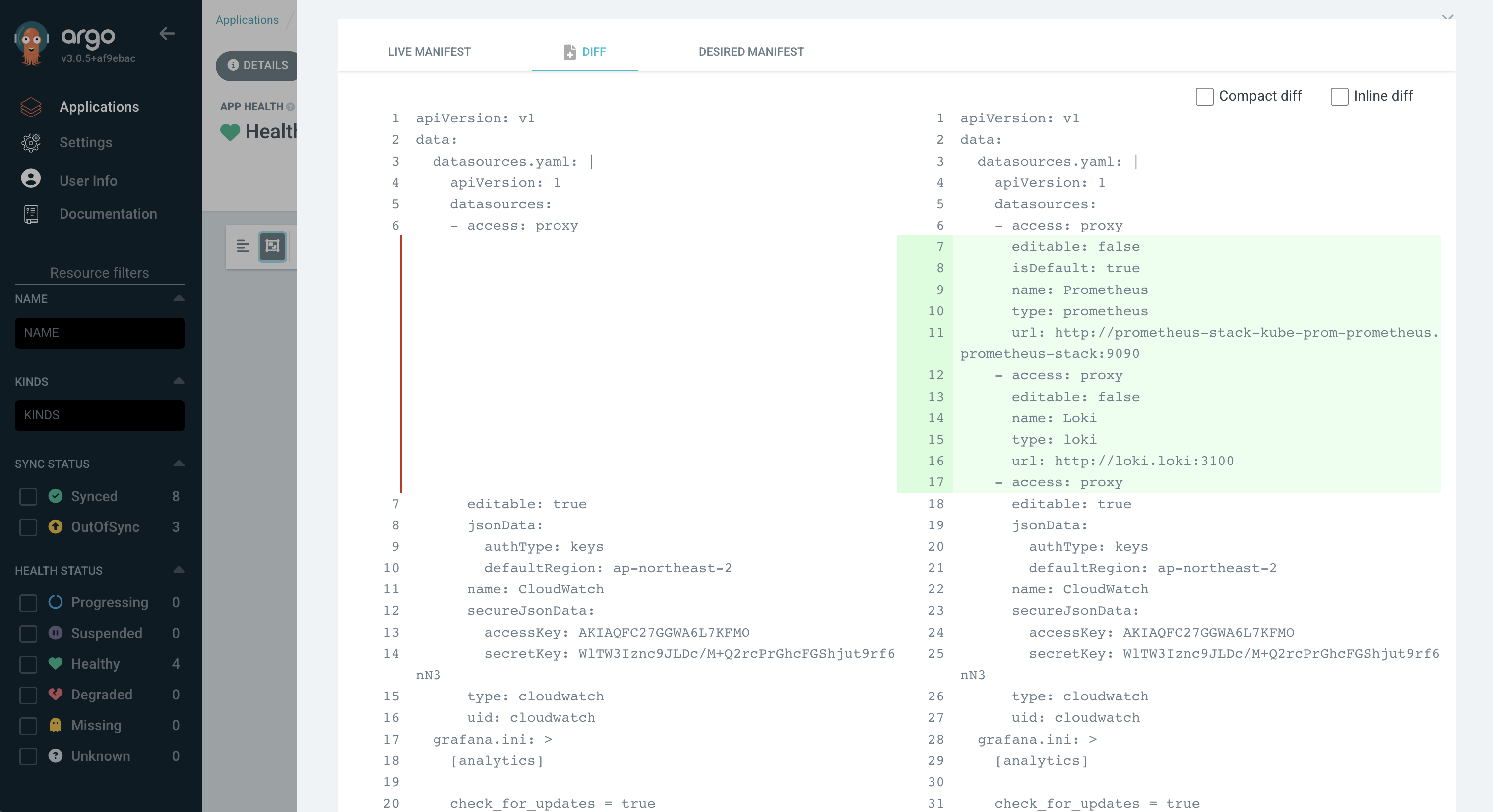
ArgoCD checks for changes using what it calls LIVE MANIFEST and DESIRED MANIFEST. LIVE represents the current state of the Kubernetes cluster, while DESIRED represents the state the cluster should be in according to the GitOps repository.
The image above shows a configuration for using Prometheus and Loki as datasources. Since no sync was performed, the desired state drifted, and you can see what differences (diffs) remain.
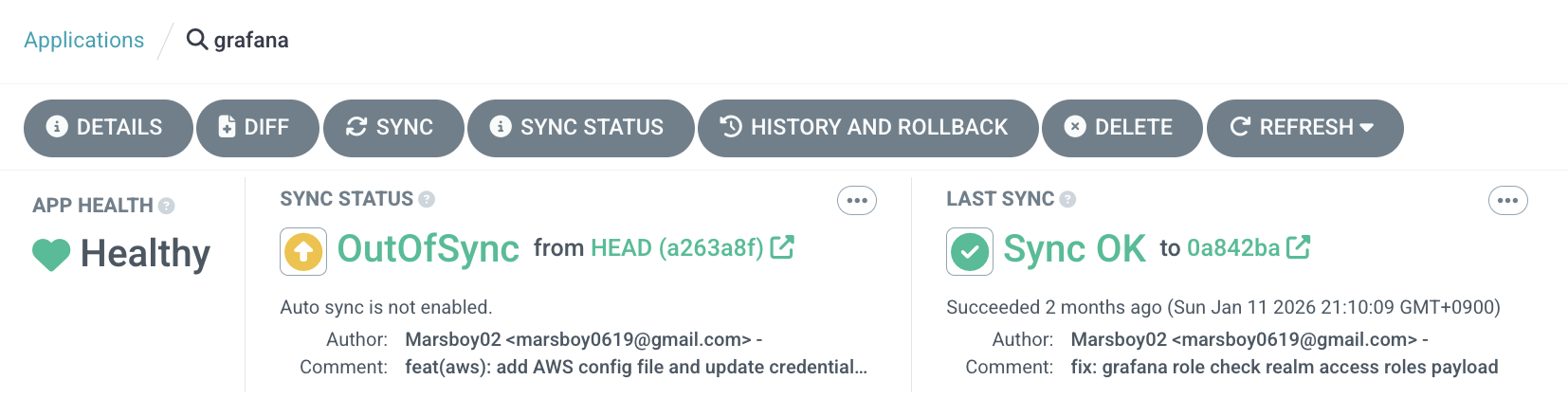
As shown above, the last sync was over 2 months ago, and the current state has changed based on the latest commit. You can use sync to align the cluster with the GitOps repository state. Since this ArgoCD Application has Auto-Sync disabled, the OutOfSync status is displayed.
If Auto-Sync is enabled, the experience is similar to a traditional CI/CD pipeline model — push to the GitOps repository and it flows through to deployment. However, under the hood it uses the pull model rather than push, which is more complex to implement but provides advantages in security and credential management.
Differences Between Traditional CI/CD and GitOps
We’ve covered the push vs. pull differences thoroughly above, so let’s focus here on what fundamentally distinguishes traditional CI/CD pipelines from GitOps.
Who Owns Deployment: Pipeline vs. Declarative State
In traditional CI/CD, the pipeline drives the entire deployment process. Tools like Jenkins, GitHub Actions, and GitLab CI handle code building, testing, image pushing, and deployment script execution sequentially within a single pipeline. Deployment means “successfully executing the last step of the pipeline.”
[Traditional CI/CD]
Code Push → CI Build → Test → Image Build → Run Deploy Script → Done
                    (A single pipeline handles everything)

[GitOps]
Code Push → CI Build → Test → Image Build → Update Manifests (CI ends here)
                                                    ↓
                                        GitOps agent detects → Apply to cluster (CD starts here)
In GitOps, CI and CD are clearly separated. The CI pipeline is only responsible for building images and updating manifests in the GitOps repository. The actual CD — applying changes to the cluster — is the job of agents like ArgoCD or Flux.
Who Knows the State of the Environment?
This is the most fundamental difference. In traditional CI/CD, deployment success is determined solely by the pipeline’s exit code. If someone modifies resources directly with kubectl edit or changes settings in the AWS Console after deployment, the pipeline has no way of knowing. Until the next deployment is triggered, nobody can guarantee what state the environment is actually in.
In GitOps, the agent continuously compares the live state with the desired state. Even if someone makes manual changes, the agent detects them and reverts to the declared state. In other words, you can guarantee that the environment always matches the Git repository.
Disaster Recovery and Rollback
In traditional CI/CD, rollback means “re-running the deployment pipeline for a previous version.” Previous build artifacts need to still exist, deployment scripts need to be idempotent, and in some cases you need to account for side effects like database migrations.
Rollback in GitOps is a single git revert. Since the desired state for every point in time is recorded in Git history, reverting to a previous commit causes the agent to automatically restore the cluster to that state. No need to re-run pipelines or hunt down old artifacts.
Multi-Environment Management
In traditional CI/CD, managing multiple environments like dev, staging, and production requires environment-specific variables and branching logic in each pipeline. As environments grow, pipelines become more complex, and understanding the differences between environments means reading through pipeline code.
In GitOps, you simply split environments into directories or branches. Kustomize overlays or Helm values files let you manage environment differences declaratively, and a single diff command reveals the configuration differences between dev and production at a glance.
gitops-repo/
├── base/
│   ├── deployment.yaml
│   └── kustomization.yaml
├── overlays/
│   ├── dev/
│   │   └── kustomization.yaml      # replicas: 1, minimal resources
│   ├── staging/
│   │   └── kustomization.yaml      # replicas: 2, similar to dev
│   └── production/
│       └── kustomization.yaml      # replicas: 5, scaled resources, HPA enabled
Auditing and Compliance
In traditional CI/CD, tracking “who deployed what and when” requires combining build logs from CI tools, deployment logs, and audit tools like CloudTrail. Each tool has different log formats and retention periods.
In GitOps, Git itself is the complete audit log. Every change is recorded as a commit, and only approved changes that pass PR review get merged — so “who, when, why, and what” is captured in a single tool. For compliance requirements like SOC 2 or ISO 27001, Git history alone is sufficient.
Real-World GitOps Patterns
When actually adopting GitOps, the first question you’ll face is “how should we structure our repositories?” This decision shapes your deployment workflow, team collaboration, and even security boundaries, so it deserves careful consideration.
Repository Structure Strategy: Monorepo vs. Polyrepo
GitOps repository structures generally fall into two strategies.
Monorepo manages application code and infrastructure manifests in a single repository.
my-service/
├── src/                          # Application source code
│   ├── main.go
│   └── ...
├── Dockerfile
├── .github/workflows/ci.yaml    # CI pipeline
└── k8s/                          # Kubernetes manifests
    ├── base/
    │   ├── deployment.yaml
    │   ├── service.yaml
    │   └── kustomization.yaml
    └── overlays/
        ├── dev/
        └── prod/
The advantage of a monorepo is that it’s intuitive for developers. Since code and deployment configurations live in the same repository, a single PR can cover both feature additions and deployment configuration changes. However, the drawbacks are clear: ArgoCD may unnecessarily trigger whenever application code changes (even without manifest changes), and it’s difficult to separate infrastructure access permissions from application code permissions.
Polyrepo separates application code and GitOps manifests into different repositories.
# Repository 1: my-service (application)
my-service/
├── src/
├── Dockerfile
└── .github/workflows/ci.yaml    # After build, update manifests in GitOps repo

# Repository 2: gitops-manifests (infrastructure)
gitops-manifests/
├── my-service/
│   ├── base/
│   │   ├── deployment.yaml
│   │   ├── service.yaml
│   │   └── kustomization.yaml
│   └── overlays/
│       ├── dev/
│       ├── staging/
│       └── prod/
├── another-service/
│   ├── base/
│   └── overlays/
└── addons/
    ├── argocd/
    ├── monitoring/
    └── ingress-controller/
Most production environments adopt the polyrepo approach. The CI pipeline builds images from the application repository and, upon completion, only updates the image tag in the GitOps repository. ArgoCD only needs to watch the GitOps repository, creating a clean separation of concerns. Additionally, you can restrict access to the infrastructure repository to only the DevOps team, establishing clear security boundaries.
Our team at UOSLIFE also uses this polyrepo structure. We maintain separate repositories for AWS infrastructure managed by Terraform and Kubernetes cluster manifests managed through GitOps.
Environment-Based Deployment Management
There are two main approaches to managing multiple environments in GitOps: directory-based and branch-based.
Directory-based splits environments into directories within a single branch (usually main). ArgoCD’s official documentation also recommends this approach.
# ArgoCD Application - dev environment
apiVersion: argoproj.io/v1alpha1
kind: Application
metadata:
  name: my-service-dev
spec:
  source:
    repoURL: https://github.com/org/gitops-manifests
    path: my-service/overlays/dev      # Environment separated by directory
    targetRevision: main
  destination:
    server: https://dev-cluster.example.com
    namespace: my-service
# ArgoCD Application - prod environment
apiVersion: argoproj.io/v1alpha1
kind: Application
metadata:
  name: my-service-prod
spec:
  source:
    repoURL: https://github.com/org/gitops-manifests
    path: my-service/overlays/prod     # Same branch, different directory
    targetRevision: main
  destination:
    server: https://prod-cluster.example.com
    namespace: my-service
The advantage of the directory-based approach is that you can instantly compare differences between environments with diff. A single diff overlays/dev overlays/prod command reveals all configuration differences at a glance.
Branch-based splits environments across branches like main, staging, and dev. While this might feel natural for teams familiar with Git branching strategies, comparing environments requires switching between branches, and merge conflicts can make operations more complex. For these reasons, the directory-based approach is more commonly used in practice.
Kustomize vs Helm
Kustomize and Helm are the two leading tools for managing GitOps manifests. They take fundamentally different approaches.
Kustomize keeps the base YAML as-is and only patches the environment-specific differences on top. The key advantage is maintaining pure Kubernetes YAML without any templating.
# base/deployment.yaml - Pure Kubernetes YAML
apiVersion: apps/v1
kind: Deployment
metadata:
  name: my-service
spec:
  replicas: 1
  template:
    spec:
      containers:
        - name: my-service
          image: my-service:latest
          resources:
            requests:
              cpu: 100m
              memory: 128Mi
# overlays/prod/kustomization.yaml - Production patch
apiVersion: kustomize.config.k8s.io/v1beta1
kind: Kustomization
resources:
  - ../../base
patches:
  - target:
      kind: Deployment
      name: my-service
    patch: |-
      - op: replace
        path: /spec/replicas
        value: 5
      - op: replace
        path: /spec/template/spec/containers/0/resources/requests/cpu
        value: 500m
      - op: replace
        path: /spec/template/spec/containers/0/resources/requests/memory
        value: 512Mi
Helm uses a Go template engine to inject values from values files. It’s advantageous when you need complex conditional logic or iteration.
# templates/deployment.yaml - Go template
apiVersion: apps/v1
kind: Deployment
metadata:
  name: {{ .Release.Name }}
spec:
  replicas: {{ .Values.replicas }}
  template:
    spec:
      containers:
        - name: {{ .Release.Name }}
          image: "{{ .Values.image.repository }}:{{ .Values.image.tag }}"
          resources:
            requests:
              cpu: {{ .Values.resources.requests.cpu }}
              memory: {{ .Values.resources.requests.memory }}
# values-prod.yaml
replicas: 5
image:
  repository: my-service
  tag: v1.2.3
resources:
  requests:
    cpu: 500m
    memory: 512Mi
| Kustomize | Helm | |
|---|---|---|
| Approach | Patching (overlay) | Templating (value injection) |
| Learning Curve | Low (pure YAML) | Medium (Go template syntax) |
| Flexibility | Best for simple overrides | Complex conditionals and loops |
| Readability | Base YAML remains valid as-is | Hard to read before rendering |
| Package Distribution | Not supported | Can package and distribute as Charts |
| Community Charts | None | Rich official/community charts |
In practice, rather than choosing one exclusively, the common approach is to use Kustomize for your own service manifests and Helm charts for third-party tools (Prometheus, Grafana, Ingress Controller, etc.). ArgoCD natively supports both Kustomize and Helm, so you can mix both approaches within a single GitOps repository.
Pitfalls When Adopting GitOps
GitOps isn’t a silver bullet. There are easy-to-overlook pitfalls during adoption, and failing to recognize them early can actually increase operational complexity.
Secret Management
The biggest weakness of GitOps is secret management. Using a Git repository as the Single Source of Truth means storing all state in Git, but you must never commit sensitive information like database passwords or API keys in plaintext. Once a secret is committed, it lives forever in Git history — even git revert can’t fully remove it.
Several tools exist to solve this problem.
Sealed Secrets, created by Bitnami, stores encrypted secrets in Git that can only be decrypted by a controller installed in the cluster.
apiVersion: bitnami.com/v1alpha1
kind: SealedSecret
metadata:
  name: database-credentials
spec:
  encryptedData:
    password: AgBy3i4OJSWK+PiTySYZZA9rO...  # Encrypted value
    username: AgCtr8OJSWK+UiWySYZZA7pQ...
External Secrets Operator fetches values from external secret stores like AWS Secrets Manager, HashiCorp Vault, or GCP Secret Manager and automatically creates Kubernetes Secrets. Only references to “where to fetch secrets from” are stored in Git, so sensitive values are never exposed in the repository.
apiVersion: external-secrets.io/v1beta1
kind: ExternalSecret
metadata:
  name: database-credentials
spec:
  refreshInterval: 1h
  secretStoreRef:
    name: aws-secrets-manager
    kind: ClusterSecretStore
  target:
    name: database-credentials
  data:
    - secretKey: password
      remoteRef:
        key: prod/my-service/db-password    # Path in AWS Secrets Manager
    - secretKey: username
      remoteRef:
        key: prod/my-service/db-username
SOPS (Secrets OPerationS), created by Mozilla, selectively encrypts only the values in a YAML file while keeping the keys in plaintext. ArgoCD supports SOPS natively through a plugin.
apiVersion: v1
kind: Secret
metadata:
  name: database-credentials
data:
  password: ENC[AES256_GCM,data:cG1c...,type:str]   # Only values are encrypted
  username: ENC[AES256_GCM,data:YWRt...,type:str]
sops:
  kms:
    - arn: arn:aws:kms:ap-northeast-2:123456789:key/abcd-1234
The right choice depends on your team’s size and security requirements, but in cloud environments, External Secrets Operator is the most widely adopted. If you’re already using AWS Secrets Manager or Vault, you can leverage your existing secret management infrastructure as-is.
Rollback Strategy
Earlier, I described GitOps rollback as simply git revert, but in practice, it’s often not that straightforward.
The most common issue is conflicts with database migrations. Even if you roll back application code to a previous version, database migrations that have already run won’t be undone. If you roll back after a migration that added new columns, the previous version of the code may be incompatible with the new schema. Therefore, migrations should always be written to maintain backward compatibility.
Another problem is cross-service dependencies. If you roll back Service A’s manifests, but Service B’s API that Service A depends on has already changed, the rollback could actually cause an outage. To prevent this, you need API versioning and backward compatibility policies across services.
ArgoCD supports two approaches to rollback:
- Git-based rollback: Use
git revertto revert manifests to a previous state. This leaves a rollback record in Git history, which is beneficial for audit tracking. This is the approach that aligns with GitOps principles. - ArgoCD UI-based rollback: Select a previous deployment from ArgoCD’s dashboard for an immediate rollback. This enables fast incident response, but creates a temporary inconsistency between Git and the actual state. You must sync the Git repository after the incident is resolved.
Operating at Scale
Adopting GitOps in a small team versus adopting it in a large organization running dozens of services is an entirely different challenge.
ApplicationSet is a feature ArgoCD provides for managing environments at scale. Instead of manually creating an ArgoCD Application for each service, you define a pattern and Applications are generated automatically.
apiVersion: argoproj.io/v1alpha1
kind: ApplicationSet
metadata:
  name: all-services
spec:
  generators:
    - git:
        repoURL: https://github.com/org/gitops-manifests
        revision: main
        directories:
          - path: "*/overlays/prod"     # Auto-detect all services' prod environments
  template:
    metadata:
      name: "{{path[0]}}-prod"
    spec:
      source:
        repoURL: https://github.com/org/gitops-manifests
        path: "{{path}}"
        targetRevision: main
      destination:
        server: https://prod-cluster.example.com
        namespace: "{{path[0]}}"
With just this configuration, adding a new service directory to the GitOps repository automatically creates an ArgoCD Application. Whether you have 10 services or 100, a single ApplicationSet handles them all.
PR-based deployment approval is also critical at scale. Rather than pushing directly to the main branch of the GitOps repository, you should configure branch protection rules so that changes can only be merged after review and approval via PR. Using GitHub’s CODEOWNERS file, you can enforce that changes to specific environments (e.g., production) require approval from the DevOps team.
# CODEOWNERS
/*/overlays/prod/    @org/devops-team    # Prod changes require DevOps team approval
/*/overlays/dev/     @org/developers     # Dev environment managed autonomously by developers
/addons/             @org/platform-team  # Cluster addons owned by platform team
Finally, alerting and monitoring. ArgoCD can integrate with Slack, Teams, and other tools to send notifications on sync status changes and deployment successes/failures. As the number of services grows, an automated system that alerts you to which services are OutOfSync or which deployments have failed becomes essential. ArgoCD Notifications can handle this, and you can also monitor overall deployment status through Grafana dashboards powered by Prometheus metrics.
Conclusion
In this post, we’ve covered a broad range of topics — from GitOps core principles to real-world application patterns and pitfalls to watch out for during adoption.
To summarize, GitOps is an operational model that treats a Git repository as the Single Source of Truth for infrastructure and applications. Through its four core principles — declarative infrastructure definitions, version control and immutability, pull-based automated deployment, and continuous reconciliation — it structurally solves problems that traditional CI/CD struggled with: environment state tracking, audit logging, drift detection, and safe rollbacks.
In practice, you’ll need to choose a repository strategy that fits your team (monorepo vs. polyrepo), combine Kustomize and Helm appropriately for manifest management, and prepare for real-world challenges like secret management and rollback strategies.
Personally, I believe GitOps has transcended being just a deployment tool or methodology — it’s becoming a central pillar of modern DevOps culture. The trend of managing infrastructure as code, reviewing changes through PRs, and automatically applying only approved changes is fundamentally about applying software engineering principles to infrastructure operations — which is the essence of DevOps itself. Major projects in the CNCF ecosystem are increasingly designed with GitOps as a given, and many companies are extending GitOps into full-fledged platform engineering.
If you haven’t adopted GitOps yet, I’d recommend starting with a small project. Set up manifests with Kustomize, install ArgoCD, push to Git, and watch it reflected in your cluster — once you experience that workflow, you’ll find it hard to go back to manual deployments.